The Bambu Lab A2L pairs big prints with little hassle, making it an excellent first 3D printer for ambitious crafters, and at a pretty good price point, too.
Bambu Lab reached out to me and told me that it would be launching the A2L, a multifunction filament 3D printer designed for the home crafting enthusiast. Of course, I said I wanted to try it.
I've spent a couple of months with it at this point, and as you might expect, I have a lot to talk about.
Let's get into it.
Bambu Lab A2L review: Knowing the difference between 3D printers
Before we get started, I want to talk about 3D printers. Specifically, the kinds of 3D printers that are available.
There are a few different types of 3D printers out there, and you're likely familiar with at least a couple of them. Typically, they're divided into two main categories: filament and resin.
Resin printers use resin and a UV light to create objects layer by layer. This kind of printing has some advantages, specifically increased accuracy and strength.
Of course, there are some downsides. Resin is highly toxic, prints require significant after-processing, and they create a truly heinous amount of hazardous waste.
Then, there are Fused Deposition Modeling (FDM) machines, or, in layman's terms, filament printers. They're faster, cheaper, and generally better for beginners.
Of the FDM printers, you can divide them down even further into CoreXY printers and bedslinger printers. A CoreXY printer features a printhead that can move on both the X and Y axes, and it's the build plate that raises and lowers to compensate for the Z-axis.
Bedslingers, on the other hand, feature a printhead that only moves on the X-axis, while the bed handles Y-axis movement. Z-axis movement is handled via the gantry, which raises and lowers the printhead as needed.
The H2C I reviewed was a CoreXY machine.
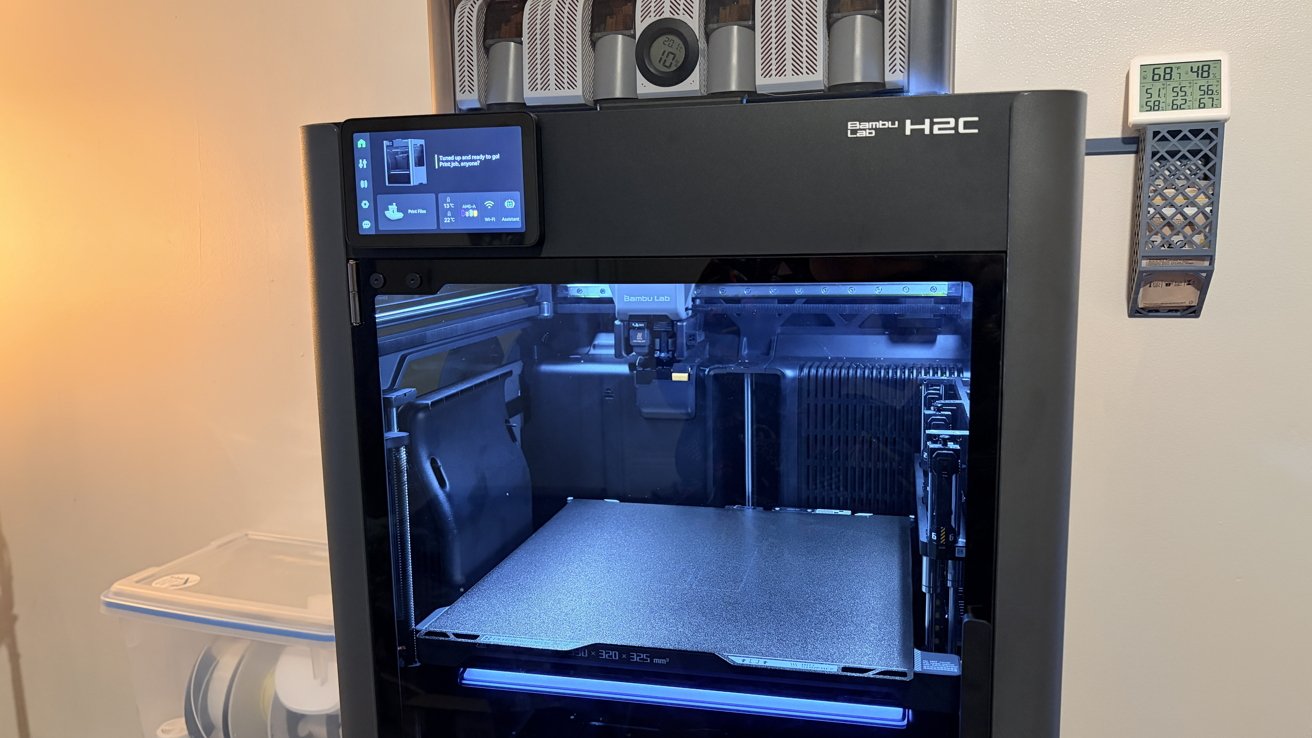
Bambu Lab H2C 3D printer
There are some massive benefits to CoreXY printers, namely that their footprint is obvious. I know that sounds silly, but there's a level of comfort in knowing whatever space the bottom of your machine takes up is, more or less, all the space that you need.
When you have a bedslinger 3D printer, you need to account for the fact that it is going to sling the bed forward as it prints. So you need to account for that, especially if you have any little ones running around who could get inadvertently javelined in the head by an enthusiastic print bed.
Many CoreXY printers are also enclosed, which makes them quieter. That may not be significant if you're running this in a basement or a spare bedroom.
It becomes a bit more significant if it's in your home office or your bedroom. A bedslinger is quite loud squirming around during a print.
And an enclosure is useful for temperature regulation, too. This becomes more crucial depending on the types of plastics you're printing. Some plastics need to be kept hot while printing to prevent warping during long, tall prints.
Many CoreXY machines also feature integrated air filtration systems. This allows you to print styrene-based plastics like ABS, which you really shouldn't do on open printers.
And, until somewhat recently, CoreXY printers were some of the only printers that could reliably handle auto-leveling, though that's starting to change. When I reviewed the Ender-3 Neo, my biggest gripe was having to manually level the bed after every print.
I never had to level the bed on the H2C — it does it all on its own. Do you know what kind of immense relief that is, coming from a world where you were expected to manually level your print bed?
But then I found out that Bambu Lab's A2L auto-levels the bed. Suddenly, a bedslinger didn't seem so bad.
So, ultimately, it depends on what you need. If you're the average hobbyist, though, a bedslinger should be just fine. But let's talk about this specific bedslinger.
Bambu Lab A2L review: Setup
For some reason, I'm always mildly nervous when I get a big box of some sort of tool like this. This time around was no different.
And, as usual, it was completely unwarranted. The A2L takes quite a bit more assembly than the H2C, but on the flip side, there's no scavenger hunt for packing screws that you have with the H2C.
The setup took all of 45 minutes, and that included me moving the printer two or three times before I found a place I wanted it to be. At no point was this task arduous, and I did it entirely by myself.
If you have a friend who doesn't mind lending a hand, you could probably get the assembly time down to under 30 minutes.
Once you get it assembled, the rest is a breeze. Bambu Lab does a great job making the software side painless.
This is doubly so seeing as I already have a Bambu Lab account. I pretty much just needed to link it to the A2L, follow a few steps on screen, and allow it to calibrate.
The time from unboxing to printing out my first Benchy was under an hour. That's really, really nice.
Bambu Lab A2L review: Performance
I'm going to come right out of the gate here and say: This is, possibly, the best starter 3D printer you could get.
Please do not conflate that statement with me saying "this is the best 3D printer you could buy."
That is not what this is.
But for a beginner-friendly, or at least budget-friendlier, does-what-it-says-on-the-box printer? I think you'd be hard-pressed to find a better one.
Let's take a second to discuss what I, personally, consider the critical talking points of this machine.
Big printing
Because I came from the H2C, my brain sees the A2L as a much, much tinier printer. And it's not. In fact, it technically allows for larger print volumes than the H2C.
The build volume is 330mm by 320mm by 325mm, a little larger than what the H2C offers. I am not joking when I say that the A2L feels like it's half the size, if not less, so this strikes me as particularly funny.

Bambu Lab A2L review: A larger print bed means you can print larger things, such as this AMS 2 platform
Where it really shines, however, is when you compare it to other similarly-priced printers that Bambu Lab makes.
For example, it has double the build volume that the P2S offers. And it comes in at $80 cheaper.
While I very rarely am printing anything that large, having the option is nice. After all, you never know when you'll run into a must-have print that requires some serious build volume.
On the subject of speed...
It's certainly not the fastest printer, but it's not horribly slow, either. My issue is that I came from the H2C, so dropping down to the A2L feels like a downgrade.
And, truthfully, it kind of is.
The H2C was a fast printer when it came to multicolor prints because it had the Vortek hotend system, which you can read about in my H2C review.

Bambu Lab A2L review: Small, single color prints, such as this weeding tool handle, only take about 30 minutes
However, the A2L is also nearly 79% cheaper than the H2C. And that's for a larger build volume.
FDM printing is never going to be lightning fast. And at this price point, you're not expecting to get a machine that you're going to use for industrial use.
For the average hobbyist, it's definitely fast enough. And coupled with high-speed filaments and a willingness to accept prints with thicker layer lines, you can still get a fair amount of speed out of this machine.
...and sound.
The A2L is significantly louder than the H2C. This isn't really an issue for me right now, as I tend to run prints overnight in my office.

Bambu Lab A2L review: The A2L moved into my new office, even before I ever did
If I were sitting next to it, I'd probably not love it. In fact, I'd probably wear my AirPods Max.
What I'm saying is: Don't subject your partners, spouses, or kids to the loud machine in more common areas of the house. Offices, finished basements, and guest rooms are all preferred to bedrooms or living rooms.
What a waste
We need to discuss printer poop.
Unfortunately, it's just a part of life. Especially life with a 3D printer.
The A2L, like most 3D printers, produces a non-negligible amount of plastic waste. This is really only a problem on the occasions that you're doing a lot of multicolor prints.
I do not print a lot of multicolor prints, so I generally don't pay close attention to how much waste a 3D printer produces. But I wanted to test multicolor printing on these adorable little flexi whale sharks.
And the amount of waste that it produced was... well. It wasn't a small amount. Regrettably, I did wind up throwing the waste into an existing container of five months' worth of 3D printer poop, which means I don't have a photo of it.
Now, I can't say that this is the fault of the A2L. The A2L isn't creating more waste for fun or as a byproduct of bad design.

Bambu Lab A2L review: the easiest way to avoid waste, when possible, is to print single-color prints and assemble after.
It's just that changing colors on a machine with a single hot-end will result in this sort of issue. Depending on the amount of color changes, you could see 30%-100% in purge waste alone.
That's a big reason why 3D printing veterans tell you to print an entire plate of multicolor prints, rather than single ones. You'll only purge between color changes, which means twelve objects have the same purge waste as one.
The main reason I mention it is because I just came from using the H2C. That machine is purpose-built, quite literally designed for multicolor prints.
The rack of six additional hot ends means you can have seven colors at once and effectively no color purge changes. It's a game changer.
If you're going to be printing high volumes of multicolour prints, I would absolutely suggest either buying or saving up for the H2C. The tool-change system will reduce the amount of color-change purge waste to near-zero, provided you're using seven or fewer colors.
Of course, if you're largely printing single-color pieces, or pieces with very few color swaps, it really does not matter. And have I mentioned that the A2L is $700 less than the H2C?
Bambu Studio
I've already talked about Bambu Studio at length before, but allow me to recap the salient points for you.
It's a great slicer and machine manager, with a visually coherent interface that's easy to understand. If you've used creative software before, much of it feels familiar; You're mostly learning the vocabulary of 3D printing.
The Prepare tab lets you adjust settings like print speed and brims without making the process feel like a headache. Slicing a model estimates filament usage by weight and length, along with cost based on your selected filament.

Bambu Lab A2L review: Bambu Studio is a great slicer for beginners and the integration with Maker World is fantastic
The Project Filaments section syncs with your AMS, making it easy to manage material types and colors. Bambu Lab's RFID-equipped spools let the machine identify the material, color, and remaining filament automatically.
It also integrates with MakerWorld, Bambu Lab's repository of thousands of free, high-quality prints. That means you can find prints via the app on your iPhone and start printing in seconds, which is a huge boon for newbies.
Bambu Lab A2L review: A cut above the rest...
So one of the neat things about the A2L is that it's not just a 3D printer; it's also a cutting machine.
You'll see a fair amount of detractors online asking who want a cutting module on a 3D printer? I suppose that's a fair question.
However, the answer is multi-hobbyists. Bambu Lab already makes 3D printers that have optional laser modules, and a lot of people enjoy those.

Bambu Lab A2L review: cutting cardstock with the A2L
And while a cutting module is somewhat less exciting than firing a laser in your house, it doesn't mean it's less useful. In fact, the fine point blade can tackle some unique materials.
- Paper (Kraft, cardstock, pearl, sticker/adhesive, sublimation transfer paper, etc.)
- Vinyl (adhesive, waterproof, heat transfer, etc.)
- PU (vegan) leather up to 0.5mm thickness
- PVC up to 0.3mm thickness
And while these are the officially supported materials, they're likely not the only ones. I highly suggest that you go take a look at what a Cricut can cut with a standard blade; there's going to be significant overlap.
Oh, and just like a Cricut, the A2L can also use a pen module, so if you want to use it to draw with markers and pens, you can do that, too.
Bambu Lab A2L review: Tips and tricks
If you are going to get this printer, I do have a few tips to make your life easier.
Get a much sturdier surface than you think you're going to need. I use a heavy-duty prep kitchen table, and I weigh it down with both weight plates and filaments.
Bedslingers really get to moving when they print, so you want to make sure they're on a stable surface. This isn't the time to cheap out and throw it on top of an IKEA side table.
Another tip is that if you're planning on printing a lot, you may want to invest in an AMS 2 system if you decide you really enjoy 3D printing.
Bambu Lab offers three AMS systems that are geared towards the A2L. The AMS Lite is a $200 open-air material system that allows you to keep four spools of filament locked and loaded at any time.
There's the AMS 2, which is an air-tight $250 material system. This is ideal if you're looking to keep your filaments dry, dust-free, and away from curious pets and kids.
Then, there's the $300 AMS 2 Pro. Like the AMS 2, it's air-tight, closed storage for four spools of filament. Unlike the AMS 2, the AMS 2 Pro also allows you to dry your filament.
If you're going to get one, go for either the AMS 2 or AMS 2 Pro. Trust me, they're both worth it.

Bambu Lab A2L review: Make your printer wear its own AMS as a hat
There's even a helpful print that allows you to attach your AMS 2 or AMS 2 Pro to the top of your A2L. This is a game changer.
If the AMS 2 Pro isn't in your budget, at least pick up the AMS Lite. Its definitely worth it.
And lastly, don't go crazy with filaments at first. Pick yourself out a few colors in a reliable, easy-to-print material, such as basic PLA.
While I've had very few failed prints on either of my Bambu Lab printers, 3D printing does have a learning curve. And, as such, you don't want to throw all your money into expensive, difficult-to-use filaments. Your patience will be rewarded.
The Bambu Lab Controversy
Before anyone jumps into the comments, I would like to point out that I'm aware of the ongoing controversy surrounding Bambu Lab. Those concerns may factor into your purchasing decision, and we at AppleInsider respect that.
This review focuses on the printer's performance, usability, and value based on my experience testing it. It is not an assessment of any dispute involving Bambu Lab, nor should a positive assessment of its hardware be read as blanket approval of the company's decisions.
Bambu Lab A2L review: So is it worth it?
So even though it's slower than the H2C and noisier than its enclosed counterparts, do I think the A2L is a good machine?
The answer here is an emphatic yes.
Now, there are a few caveats to my recommendation. If you're planning on printing any styrene-based plastics, you have to get an enclosed machine; that is non-optional. And I'd probably go with the H2C or something out of Bambu Lab's X-line.
If you're extremely cramped on space, this machine might be a little too big to justify, too. At that rate, I'd suggest getting an A1 mini.
If you've got kids or plan on throwing this in a mixed-use workshop, it might be smarter to go for something like the P2S, which is enclosed. It means you won't worry about taking out your four-year-old with a printbed or clogging up your airflow system with wood dust.
But if you want to try out a Bambu Lab printer and you want some reasonable future-proofing, this is the one to get. It's built for big prints, it auto-levels, and it's perfect for beginners and experts alike.
Seriously, it's that good.
Rating:
4.5 out of 5 stars
Bambu Lab A2L Pros:
- Exceptionally easy setup
- Auto-levels
- Works well with Bambu Lab's apps
- Easy maintenance
- Large print volume
Bambu Lab A2L Cons:
- Louder than enclosed printers
- Bedslingers may not be appropriate for households with young children
- Some people who prefer more open-source 3D printing will likely want to choose another model.
Where to buy the Bambu Lab A2L:
If you want your own A2L, you can pick one up from Bambu Lab starting at $469. There are additional options, including an AMS system and the cutting combination, that are available at higher price points.


