Apple designs hardware for the ages — sometimes quite literally. The Cult of Mac Setups archive is full of users who never got around to retiring an old Cinema Display. Or who deliberately hunt one down online for new-to-them use. Some keep a 2013 “trash can” Mac Pro running as a daily driver because it still gets the job done. Some love old gear so much they maintain as much as possible — or at least classic posters — in their setup. And here’s the result: the best vintage and retro Setups in our archive.
This post contains affiliate links. Cult of Mac may earn a commission when you use our links to buy items.
Best vintage and retro Apple setups
Some setups get seriously into the vintage and retro spirit, even beyond fondness for Cinema Displays and aging Mac Pro towers. They might boast a working Macintosh SE/30s, a glowing iMac G3 pressed back into retro-gaming service or iBook “clamshells” displayed as objets d’art.
What all these setups share is a refusal to treat Apple hardware as disposable. And a realization that the old stuff is, in many cases, still the most beautiful gear in the room. Here are 12 of the finest examples from the archive, spanning gear from 2005 to 2015 still in regular use, alongside the latest Apple silicon.
12. A classic PowerBook G4 poster elevates a modern MacBook Pro setup
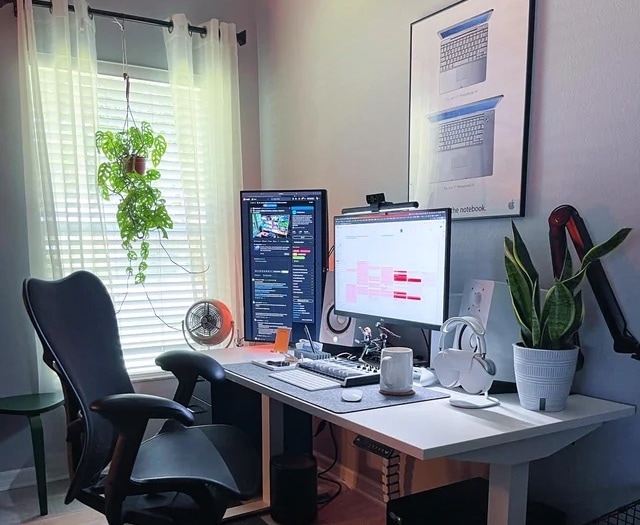
Photo: [email protected]
An M1 Pro MacBook Pro setup got a second monitor — a 27-inch QHD Dell in portrait mode — and that would be pleasant enough. But what stopped commenters cold is the framed vintage Apple poster on the wall above the desk: an original PowerBook G4 advertisement, promoting Apple’s first laptop with a widescreen, circa 2002. “That poster brings back so many memories,” wrote one commenter. The user’s response was quietly poignant. He’d coveted a PowerBook in his early 20s but couldn’t afford one; by the time he could, the Intel era had arrived. The poster is a marker of desire deferred, now hanging above a desk that holds exactly the kind of powerful portable he always wanted.
Read more: Portrait-mode monitor and classic Apple poster pump up workstation
Supercharged by M5
The 14-inch MacBook Pro with M5 brings next-generation speed and powerful on-device AI to personal, professional and creative tasks. Featuring all-day battery life and a breathtaking Liquid Retina XDR display with up to 1600 nits peak brightness, it’s pro in every way.
Along with its faster CPU and unified memory, M5 features a more powerful GPU with a Neural Accelerator built into each core, delivering faster AI performance.
- Great single-core CPU performance
- Great GPU improvements
- Notably faster SSD speeds
- Excellent display and speaker system
- Same price as previous generation
- Identical design to 3 previous generations
- No Wi-Fi 7 or Thunderbolt 5
- Battery life unchanged from M4
- 16GB base RAM feels limiting for "Pro" machine in 2025.
Big size and resolution
Get the same size and resolution of Apple’s massive Pro Display XDR for a third the price. This display is also a Thunderbolt 5 dock, making it a top choice for newer Macs. Despite its high price, though, it only has a standard refresh rate and brightness.
- Massive 6K resolution
- Thunderbolt 5 dock
- Slim attractive design
- Only 600 nits brightness
- Standard 60 Hz screen
We earn a commission if you make a purchase, at no additional cost to you.
11. Bring new life to an old Intel-based iMac or Mac mini
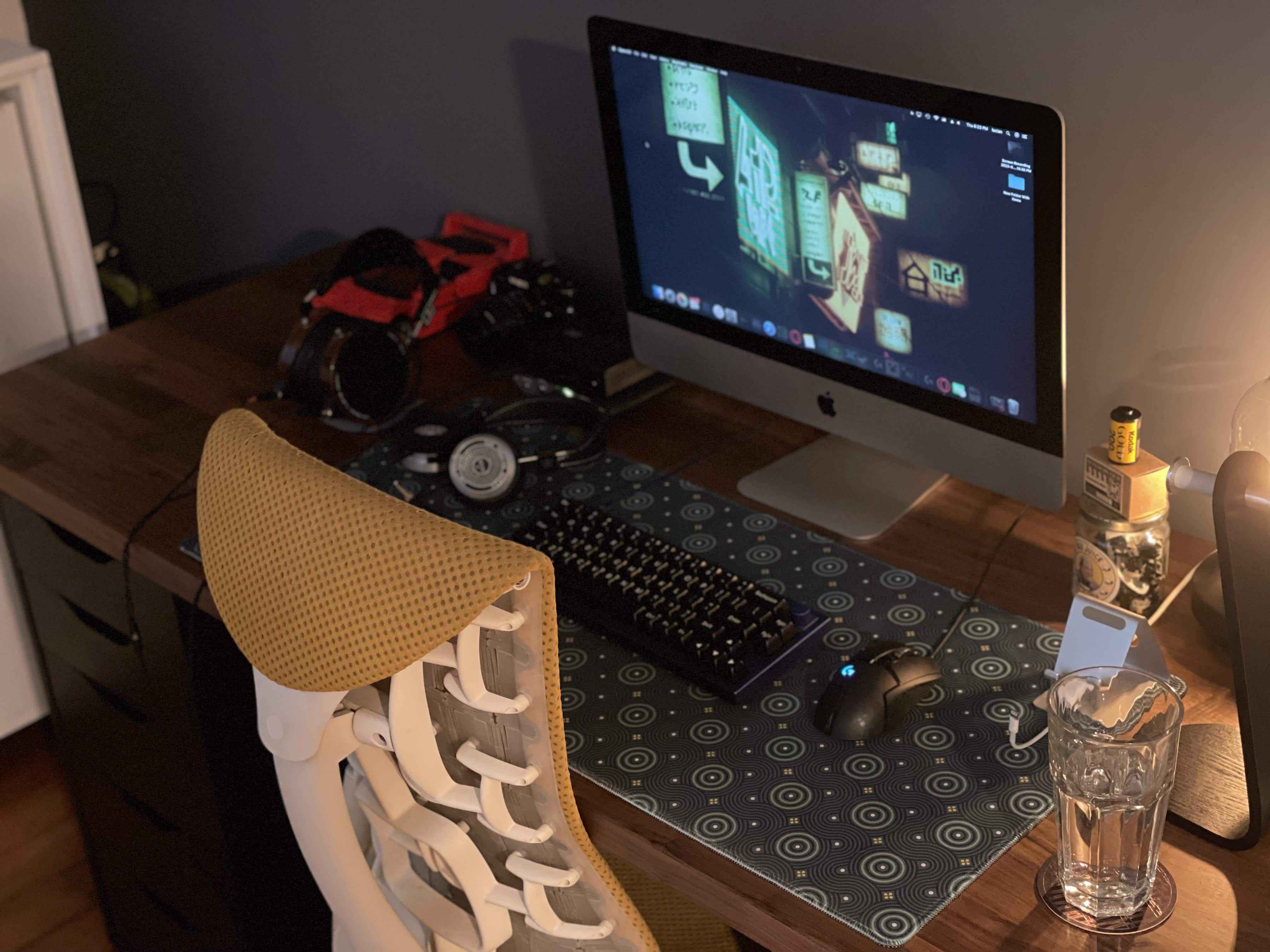
Photo: [email protected]
This setup is a practically useful retro entry. The user’s aging Intel-based iMac slowed down noticeably under macOS Monterey. But rather than retire it, they replaced its startup disk with an external SSD. That’s a trick that dramatically speeds up Intel Macs whose internal drives have become a bottleneck. The article documents the process in full, making it as much how-to guide as setup feature. The iMac itself, still good-looking and functional, continues serving its purpose in a proper workspace. It’s the most pragmatic kind of Apple nostalgia. It keeps old gear not for sentiment but because it works — and it knows how to make it work better.
Read more: Bring new life to an old Intel-based iMac or Mac mini
USB-C and USB-A together
4.5
Easily store & transfer sophisticated data across devices with the versatile dual Type-A & Type-C️ connectors — ideal for on-the-go advanced tech users.
- USB-C and USB-A
- USB 3.2 Gen 2 for fast file transfers
- Small, metal outer casing
10. Old-school cool Mac rig rocks Cinema Display, HK SoundSticks
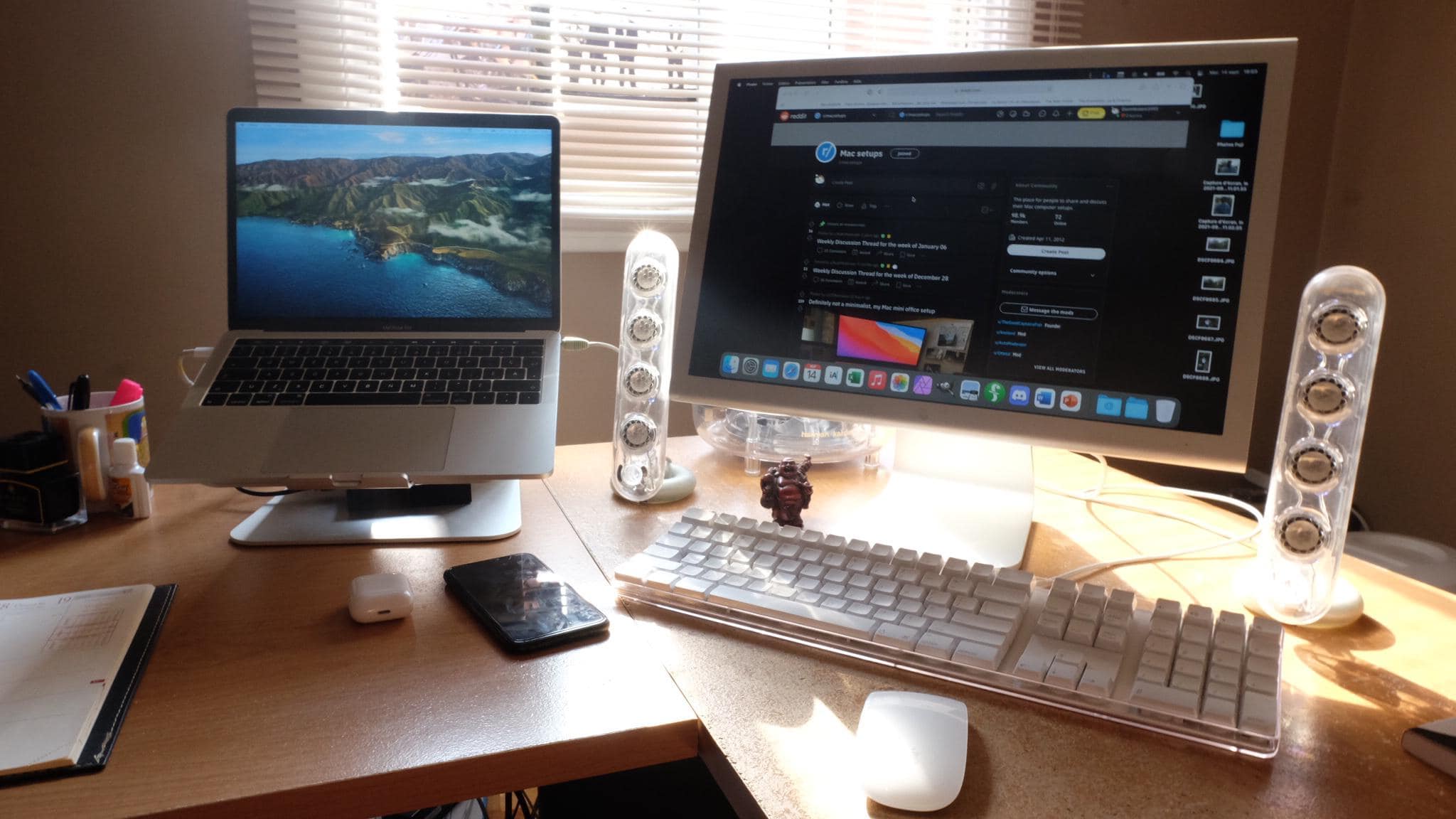
Photo: [email protected]
A vintage aluminum-era 20-inch Cinema Display — the kind Apple sold, circa 2005, for $1,299 — sits at the center of a setup featuring an old Apple USB keyboard that shipped with G4 and G5 machines. The real visual star, though? The Harman Kardon SoundSticks. They feature a speaker design so distinctive it entered the permanent collection of New York’s Museum of Modern Art. “If it ain’t broke …” runs the implicit philosophy here. And nothing in this setup is broken. The gear gets happily used. The combination of the Cinema Display’s clean aluminum aesthetic and the SoundSticks’ crystalline sculpture makes for a desk that looks less like a retro curiosity than a deliberate design statement.
Read more: ‘Old-school cool’ Mac rig rocks Cinema Display, HK SoundSticks
9. Crucial dock connects new MacBook Pro to classic Cinema Display
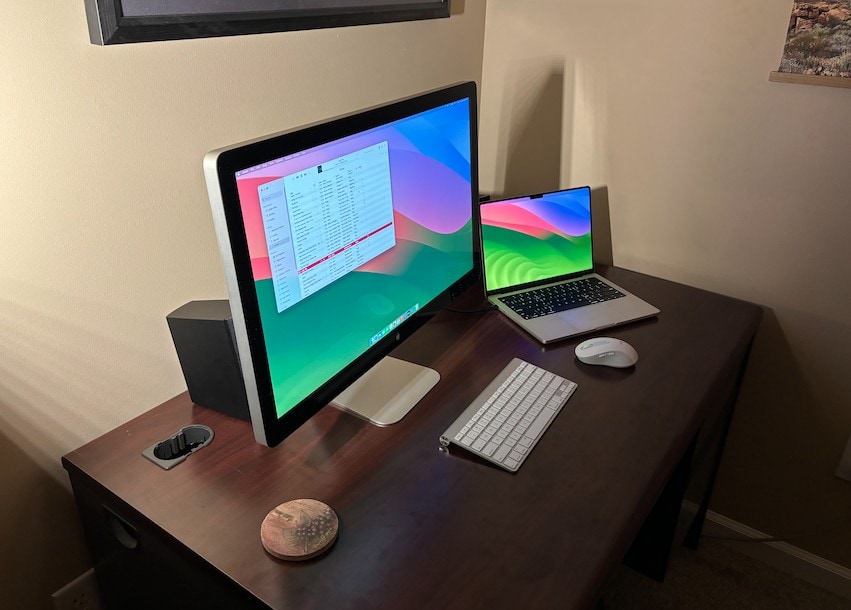
Photo: [email protected]
An M1 Pro MacBook Pro runs through a Dell WD15 Monitor Dock into a 13-year-old LED Cinema Display — a setup that required a specific dock choice to handle the compatibility gap between modern Thunderbolt 4 and the Cinema Display’s aging Mini DisplayPort connection. That came with caveats: the connection is not always reliable, requiring a chain of adapters. But the Cinema Display’s image quality, the user reported, still holds up well next to modern screens for everyday productivity use. The comment thread turned into a useful guide for anyone else trying to keep their old Apple display running with newer Macs.
Read more: Crucial dock connects new MacBook Pro to classic Cinema Display
This 4K dual-display docking station comes with a 180-watt adapter and USB-C connectivity.
Powerful but portable
The 14-inch MacBook Pro with the M5 Pro chip brings next-generation speed to personal, professional, and creative tasks. With all-day battery life, double the starting storage, and a breathtaking Liquid Retina XDR display, it’s pro in every way.
8. Modern MacBook and vintage displays make retro-cool setup

Photo: [email protected]
An M1 Pro MacBook Pro from 2021 drives a pair of Apple displays both from around 2010: a Thunderbolt Display in landscape on the left and a Cinema Display in portrait orientation on the right, both sporting 2560 x 1440p resolution. The user keeps them arm-mounted, with a webcam perched on top of the landscape display, and plans to run them until they fail or Apple refreshes the Studio Display with something compelling enough to replace them. “Planning to keep using these until they either die,” the user said. The matching aluminium aesthetic of the old Apple displays, arranged in landscape-portrait symmetry, looks coherent and composed — demonstrating that vintage Apple displays age with more grace than almost any competing brand.
Read more: Modern MacBook and vintage displays make retro-cool setup
This 4K HDMI to Mini DisplayPort adapter with Active HDMI 1.4 works with Xbox One/360, Mac mini, PC/laptops to Mini DP 1.2, monitor out with DisplayPort/Mini DisplayPort.
7. New MacBook Air pairs with classic Cinema Display
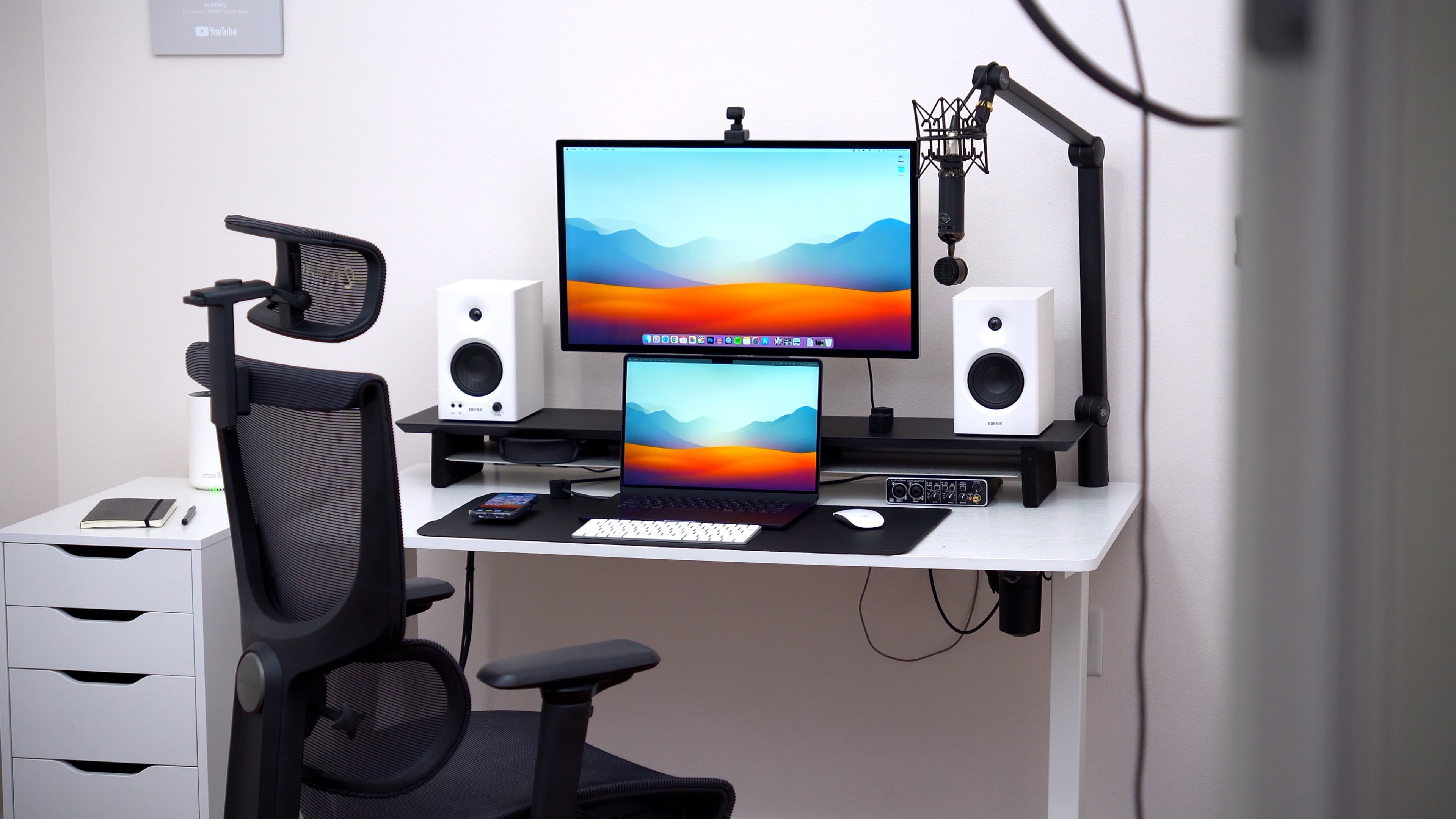
Photo: Wade B. TechDaily
A 15-inch M2 MacBook Air drives a 30-inch Apple Cinema Display that was new approximately 15 years before this 2023 article was published. At 2560 x 1600p, the 30-inch Cinema Display remains a large, capable screen by any contemporary standard — and its aluminum and black glass design still looks elegant on a desk. The user pairs it with a Magic Keyboard and Magic Mouse, creating an all-Apple aesthetic that spans roughly 15 years of product history. Apple made the 30-inch Cinema Display from 2004 to 2010. The fact that one is here serving as the primary display for an M2 laptop in 2023 is an endorsement of the company’s hardware longevity that no marketing could manufacture.
Read more: New MacBook Air pairs with classic Cinema Display
Portable computing power
Built for Apple Intelligence, this super-lightweight laptop packs power. It features a 15.3-inch Liquid Retina Display, 24GB Unified Memory, 512GB SSD Storage, backlit keyboard, Touch ID;. Midnight color.
- Slim and lightweight
- Large and brilliant screen
- Plenty of memory and storage
- May lack some features compared to MacBook Pro
Apple ecosystem-ready
Pairing automatically with your Mac, Magic Keyboard delivers a remarkably comfortable and precise typing experience. It’s also wireless and rechargeable, with a long-lasting internal battery.
- Pairs automatically with Mac
- Comfortable and precise typing experience
- Wireless and rechargeable
- Long-lasting internal battery
- No RGB backlighting
- No multidevice pairing
6. Old Thunderbolt displays keep up with new Studio Display
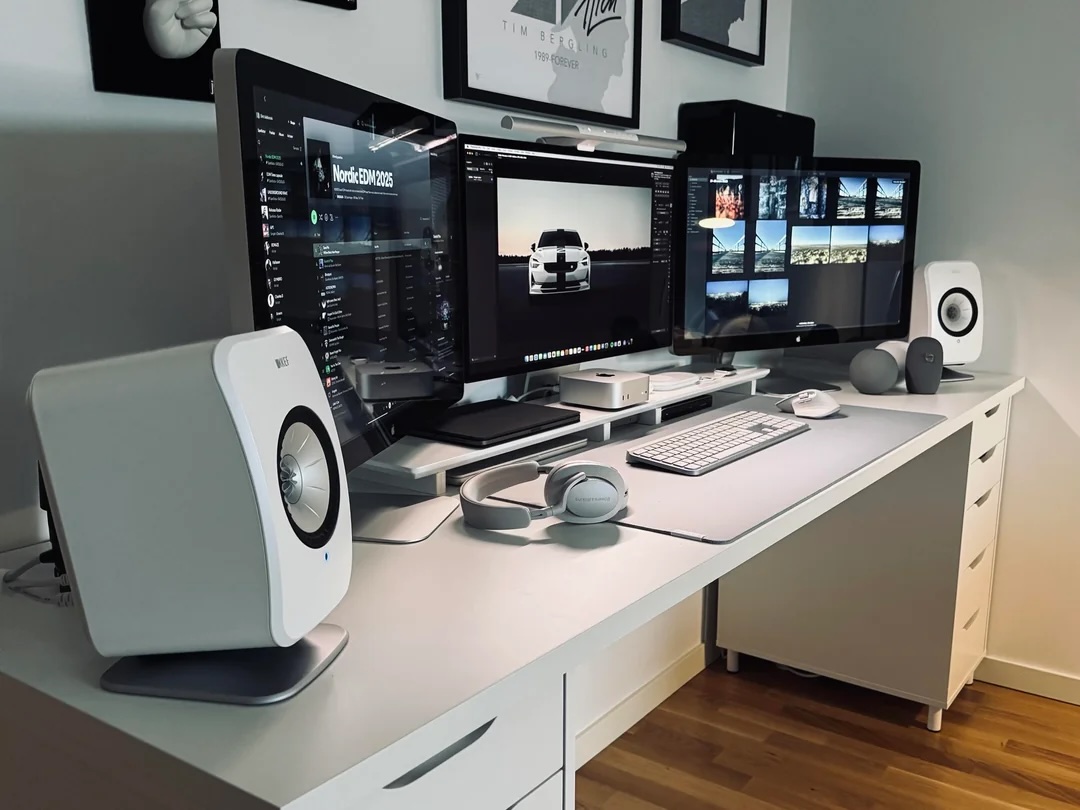
Photo: [email protected]
This Swedish user declared 2025 “the year I finally got my dream setup” — and the dream, curiously, involves Apple displays discontinued in 2016. Two older 27-inch Thunderbolt Displays flank a newer Studio Display in a triple-screen arrangement driven by an M4 Mac mini and an M1 MacBook Pro. The Thunderbolt Displays’ 2K resolution makes them noticeably softer than the 5K Studio Display, and the user is aware of the gap. But the all-Apple aesthetic — the matching aluminium and glass design language tying old and new together across more than a decade — satisfied them more than any mixed-brand modern alternative would. KEF LSX II speakers complete the refined setup.
Read more: Old Thunderbolt displays keep up with new Studio Display
Apple's 27-inch 5K Retina monitor, with nano textured glass and tilt-adjustable stand.
Mini but mighty!
Apple's tiny new desktop features an M4 chip with 10‑core CPU and 10‑core GPU "built for Apple Intelligence," plus 16GB of unified memory, a 256GB SSD storage and a Gigabit Ethernet port.
- Apple M4 chip is powerful
- Compact desktop design
- Headphone jack on front
- BYODKM (bring your own display, keyboard and mouse)
5. 16-year-old Mac Pro drives even more-ancient Cinema Display

Photo: [email protected]
A 2008 Mac Pro “cheesegrater” — 16 years old at the time of the article — drives a 30-inch Apple Cinema Display estimated to date from around 2005, making the display about 19 years old. The user upgraded the Mac Pro’s RAM and storage, and found its performance roughly equivalent to a 2012 MacBook Pro on Monterey. Commenters expressed reflexive admiration: “Awesome setup, love to see a cheese grater in the wild!” The user was characteristically practical: “I don’t do any real gaming or heavy tasks.” This is old Apple hardware living out a quiet, dignified second life in 2024, kept running with a RAM upgrade and sheer stubborn affection — about as retro as any daily-driver setup in the archive gets.
Read more: 16-year-old Mac Pro drives even more-ancient Cinema Display
Massive desktop power
Get supercharged Apple silicon with the Apple Mac Pro. Featuring the M2 Ultra 24-Core CPU, Mac Pro allows creative professionals to tackle the most demanding workflows with speed and efficiency.
- Apple M2 Ultra 24-Core CPU
- 60-Core GPU, 32-Core Neural Engine
- 8 x Thunderbolt 4 Ports
- Choice of memory and storage capacity
4. Trash can Mac Pro bathes in vintage Apple posters’ glory
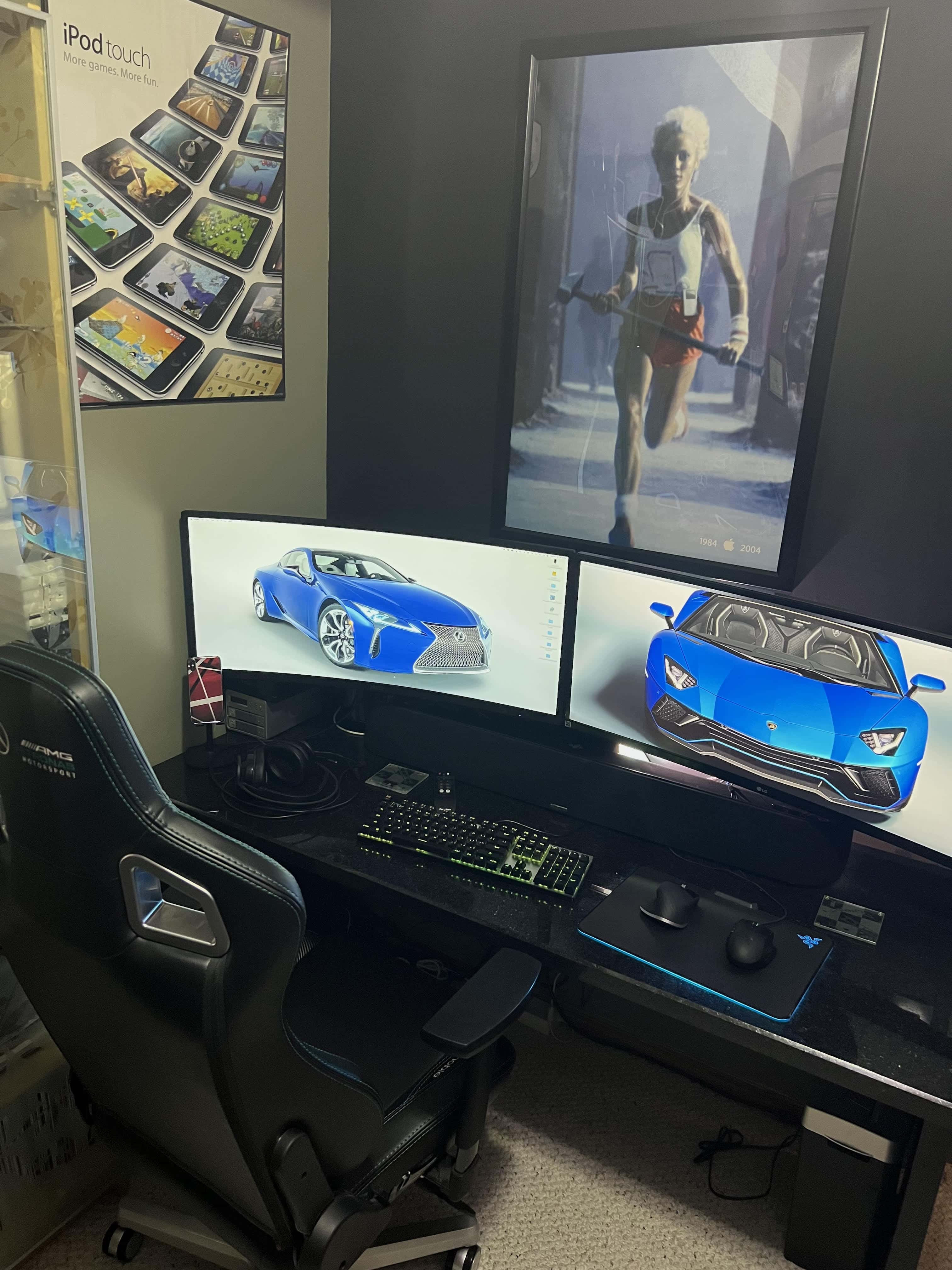
Photo: Michael De Jong
A 2013 Mac Pro “trash can” anchors this setup, but the visual centerpiece is the wall art behind it. We see a large reproduction of the iconic Ridley Scott “1984” Super Bowl ad poster with an iPod Photoshopped in, from the MacWorld 20th anniversary of the commercial. And an early iPod touch poster sits above it to the left. Collector Michael De Jong assembled a workstation where the vintage advertising art does as much work as the hardware in communicating an Apple aesthetic rooted in the company’s most legendary eras. The juxtaposition of a cylindrical trash-can Mac Pro beneath ‘1984’ imagery and early iPod nostalgia is a quietly audacious design choice.
Read more: Trash can Mac Pro bathes in vintage Apple posters’ glory
3. This designer built a setup around Macs old and new
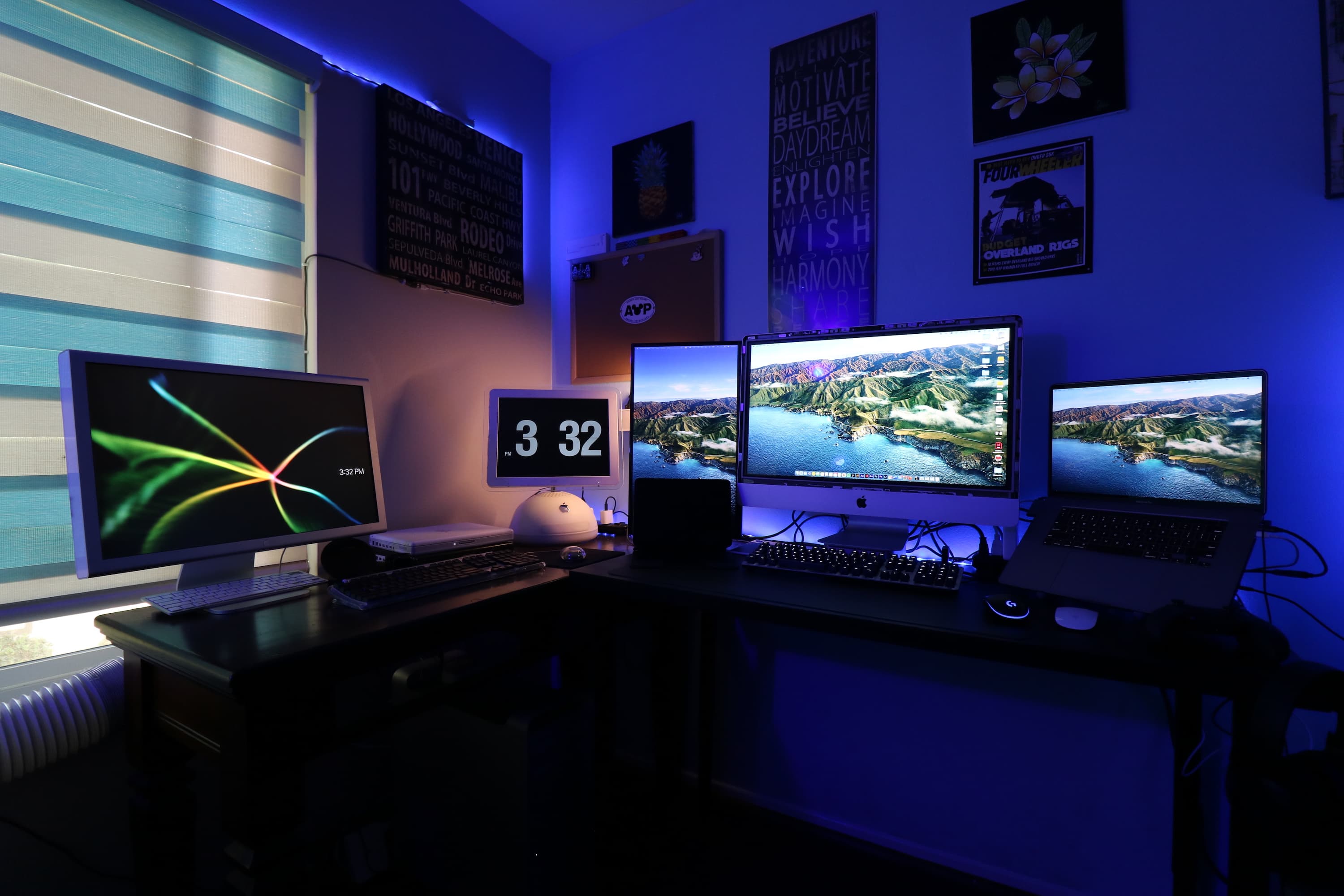
Photo: u/jhoule1394
A designer who describes himself as someone who would rather use discontinued Apple products than a new Microsoft machine traded a Surface Book 2 for a 2009 Mac Pro and a 2009 iMac. The Mac Pro is connected to a 23-inch Apple Cinema Display; the iMac runs in Target Display Mode for a 2020 MacBook Pro. A 2006 Mac mini case serves as a monitor riser. An iBook G4 and an iMac G4 — the latter acquired at a swap meet for $10 — run original games like SimCity and Oregon Trail. Every vintage machine has been found a purpose; nothing is merely decorative. The setup manages to span nearly 20 years of Apple product history while remaining a functional, active workstation — an impressive act of material loyalty.
Read more: This designer’s setup is built around Macs old and new
All-in-one dream machine
4.0
Colorful and capable, Apple's refreshed all-in-one desktop computer is fun and functional.
- M4 chip for great performance
- Seven color options, with color-matched accessories
- 24-inch 4.5K display looks great
2. Apple classics: If it ain’t broke, don’t replace it

Photo: [email protected]
A 2013 Mac Pro “trash can” drives not one, not two but three Cinema Displays from an earlier era — hidden behind the monitors’ combined mass. It’s almost as if the cylindrical machine feels shy about being the oldest thing in the room. But the retro credentials don’t stop there. The user also runs an original Apple iSight webcam from the early 2000s, a Mighty Mouse (discontinued in 2009) and a solar-powered keyboard. The iSight, asked about on Zoom, is reported to perform better in low light than many modern webcams. The full complement of discontinued Apple peripherals, combined with three vintage Cinema Displays and the infamous trash can, makes this the most comprehensively retro active workstation in the archive.
Read more: Apple classics: If it ain’t broke, don’t replace it
Massive desktop power
Get supercharged Apple silicon with the Apple Mac Pro. Featuring the M2 Ultra 24-Core CPU, Mac Pro allows creative professionals to tackle the most demanding workflows with speed and efficiency.
- Apple M2 Ultra 24-Core CPU
- 60-Core GPU, 32-Core Neural Engine
- 8 x Thunderbolt 4 Ports
- Choice of memory and storage capacity
1. ‘Headless’ MacBook Air runs alongside retro Macs
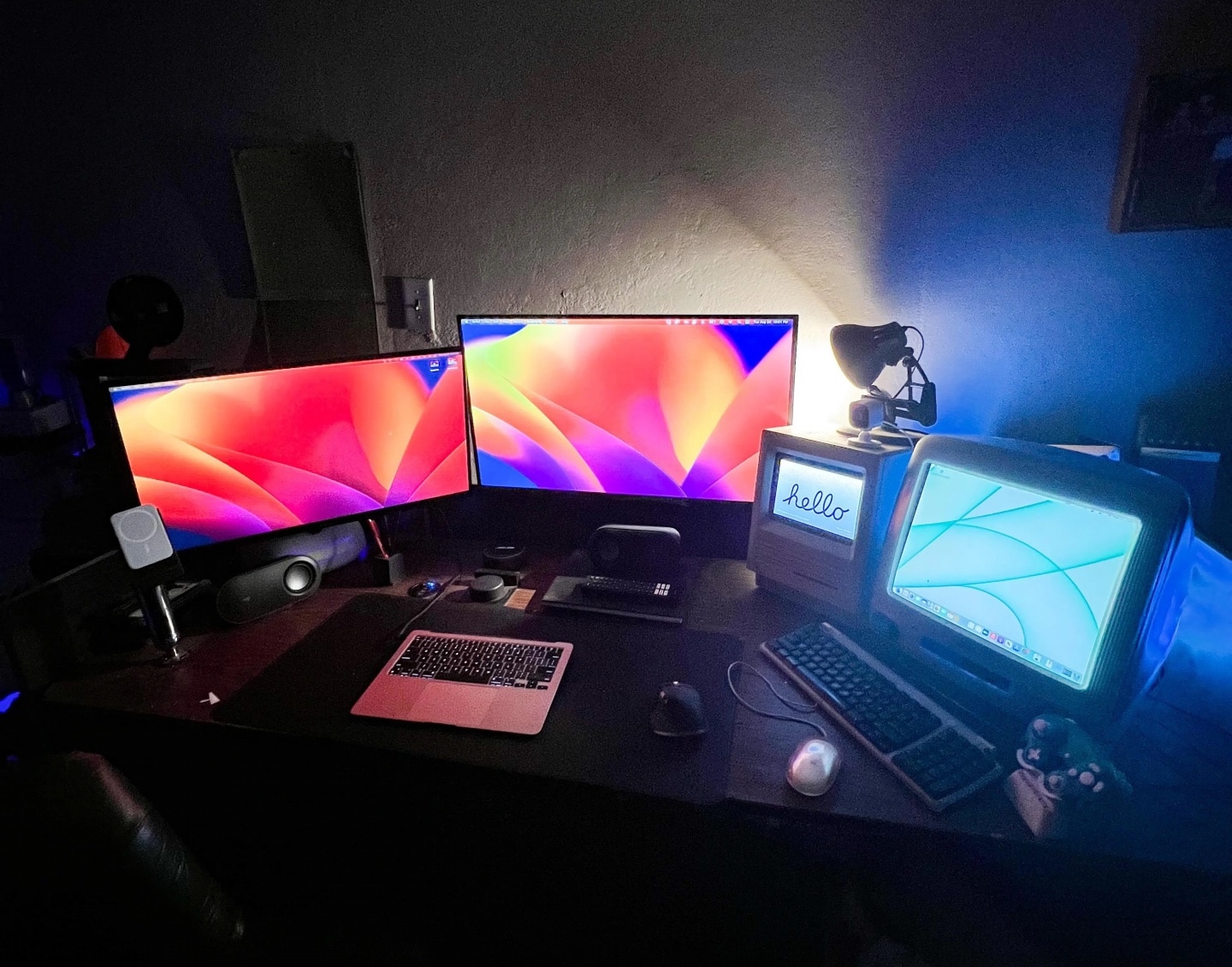
Photo: [email protected]
A MacBook Air with a broken screen had its display removed entirely, leaving just the bottom half — keyboard, trackpad and ports intact — running as a compact desktop machine. But the real spectacle flanks it: a fully working Macintosh SE/30 from January 1989, glowing from its built-in screen, and a colorful iMac G3, repurposed as a retro-gaming machine using a GameCube controller. The SE/30 has been hollowed out and fitted with an Amazon Echo Show 8 to run smart-home devices. “BRO! You ripped the monitor off and made a…. WTF this is awesome,” gasped one commenter. The iMac G3’s translucent case and the SE/30’s compact monochrome screen flank the headless Air in a tableau spanning 35 years of Apple design history — all of it lit up and operational. It’s sheer retro spectacle.
Read more: ‘Headless’ MacBook Air runs alongside retro Macs
Portable computing power
Built for Apple Intelligence, this super-lightweight laptop packs power. It features a 15.3-inch Liquid Retina Display, 24GB Unified Memory, 512GB SSD Storage, backlit keyboard, Touch ID;. Midnight color.
- Slim and lightweight
- Large and brilliant screen
- Plenty of memory and storage
- May lack some features compared to MacBook Pro
Logitech's flagship MX Master mouse stands out for its precision, features and ergonomic design. The 8K Darkfield sensor ensures the mouse can track on any surface, with the Quiet Click technology helping provide near-silent clicks. Take advantage of the customization buttons and electromagnetic scroll wheel to further boost your productivity.
- 8K DPI sensor
- Exhaustive set of features
- Customizable buttons
- Prone to connection dropping issues on Macs

David Snow, an expert on Apple hardware and software, writes on a variety of technological and cultural topics for Cult of Mac. They include Apple news, technology buying guides, and features about computer setups and Apple TV shows and movies.
With 30 years of experience covering technology and other subjects, he has written and edited for numerous print and online publications, including CMP Media, TechTV.com, CNET, Wired News, Red Herring magazine, Law.com, The National Law Journal and Law Technology News magazine. Among other roles, he served as executive editor of the Law.com network of websites and editorial director, technology, for ALM Media.
Snow graduated with a B.A. from Syracuse University with majors in magazine journalism and psychology. While there, he worked as a reporter for The Daily Orange newspaper and associate editor of Equal Time magazine.
Founder of the blog At the Waterline, he can be reached on X (formerly Twitter) via @atthewaterline and on Mastodon via @dsnow.