GoPro Wireless Mic System review: An audio upgrade with fixable flaws
GoPro's Wireless Mic System nails the basics, but it has some frustrating flaws.
Despite being a GoPro product, the Wireless Mic System isn't limited to action cameras. The main selling point here, though, is its direct connectivity to GoPros. Since the Hero 12, you could connect a Bluetooth microphone directly. Ironically, that meant, up until now, DJI's Mic Mini and Mic 3 were likely the best options for connecting directly to a GoPro as those both offer Bluetooth alongside a physical receiver.
Pairing the Wireless Mic System with the camera is simple: Turn on one of the microphones and tap the power button three times to switch to Bluetooth mode. Turn the mic off, then back on while keeping the power button held down to pair. The GoPro recognizes the mic and you're all set. You can pair either microphone to the camera, but only one at a time. A single press of the mic button turns on noise reduction and a white LED confirms it's activated.
Using either of the receivers is as simple as connecting to the camera or PC via USB or 3.5mm (depending which one you're using) and then turning on the mic. Unless you last used it with a Bluetooth connection, in which case, three taps of the power button will put you back in receiver mode.
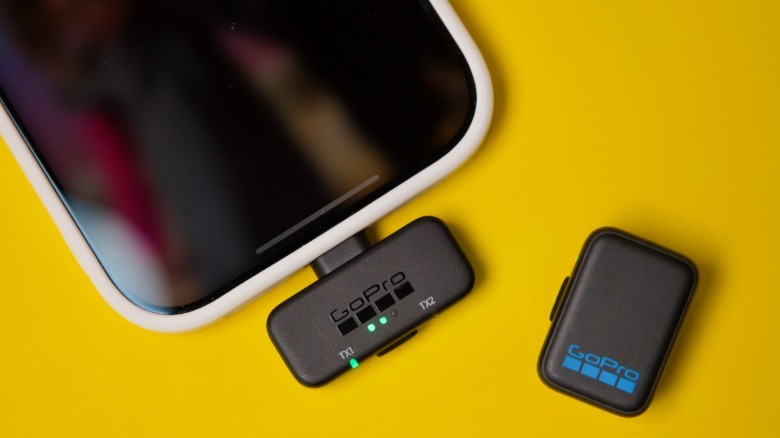
While it's a major benefit to connect a mic to a GoPro without a receiver, the hardware receiver offers superior audio quality. What's more, it means you can use both mics at the same time. The USB receiver is designed to fit neatly into a GoPro's recessed USB port. You don't need to fully remove the protective door from the camera, but you can if you want things to look a little neater. If you plan on using the kit with a phone, the dongle slightly extends from the base of your handset, but it's snug and practical, and feels secure.
 James Trew for Engadget
I noticed while using both microphones and the USB receiver, the GoPro only shows one VU meter on its display. At first, it looks like only one mic is connected, but watching back through the video, both are in fact recorded.
In this setup, the mics record in "split" mode, one mic on the left channel and the other on the right. This is jarring when listening back on headphones or a TV with connected speakers. The TRS receiver lets you change between mono or stereo, but right now there's no apparent way to do this with the USB dongle. This means you need to convert the track to mono in editing software, which adds friction if you just want to share a clip directly from your phone or PC.
With your phone, you can side-step this issue with apps like Blackmagic camera that have the option to merge both channels, but most native camera apps don't offer this. Combined with the UI issue mentioned above, it feels a little clumsy. The good news is, it should be easy to fix in a firmware update. GoPro itself has two apps — Quick and the Fluid camera — that could offer a way to update settings on the USB dongle, but right now you're stuck with workarounds.
While we're talking feature requests, there's no way to start and stop recording on a GoPro with GoPro's own mics, something DJI offers and a feature I use all the time with its Osmo cameras. It's a small detail, but I feel it's a missed opportunity.
Originally published on Engadget