Instagram now lets you add tagged photos to your profile grid
Instagram now lets you bring tagged photos to your main profile feed, and here's how to do it.
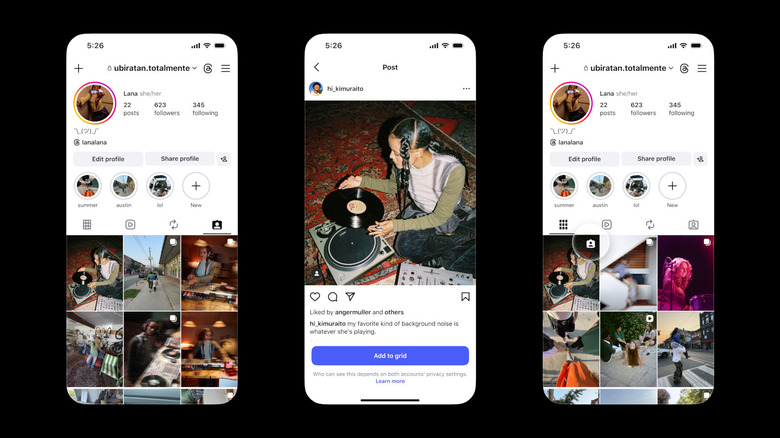
Instagram will now let you promote tagged photos to your main profile grid. The Tagged tab still exists, and it's still where you can see all the posts you've been tagged in. But if there are particular posts that you would like to display on your main grid, you can now do that, as well. Instagram says you can do so for favorite group photos, creator collaborations and memories, but really, you can add any post you'd like.
There are several ways to add a tagged post to your grid. You can do it straight from the DM notification you receive when you're tagged or from the three-dot menu on the upper right portion of the post you're tagged in. You can also press and hold a post in your Tagged tab to see the option. Under the "Add to grid" button, you'll see a notice saying that even if you add the post to your profile, who can see it depends on the privacy setting of your account and the account of the user who tagged you.
If you change your mind in the future, you can easily remove a tagged post from your profile without having to delete it completely. All tagged posts you add will show up on your grid in reverse-chronological order by default. However, you can rearrange them as you see fit. If you'll recall, Instagram introduced the ability to reorder posts on your profile back in June, a year after it was announced. You can move posts around regardless of when they were made, so you can achieve whatever aesthetic you're aiming for when it comes to your Instagram account.
Originally published on Engadget