GymKit has been one of Apple Watch’s smartest fitness features since it launched in 2017. Tap your watch to compatible gym equipment, and Apple Watch shares your heart rate while the machine sends back metrics like distance, incline, pace, and calories.
With iOS 27, Apple is expanding that idea beyond Apple Watch. I tested the new GymKit on iPhone and AirPods Pro 3 ($179, reg. $249) experience with a GymKit-compatible treadmill. It basically gives you the Apple Watch GymKit workout tracking experience, just without the watch. This could be useful in a lot of scenarios.
GymKit, no Apple Watch required
The setup is simple. I tapped my iPhone to the treadmill, picked Indoor Walk (Indoor Run is also offered), and started the workout from the treadmill. With GymKit, workout data is stored privately on iPhone and removed from the equipment.
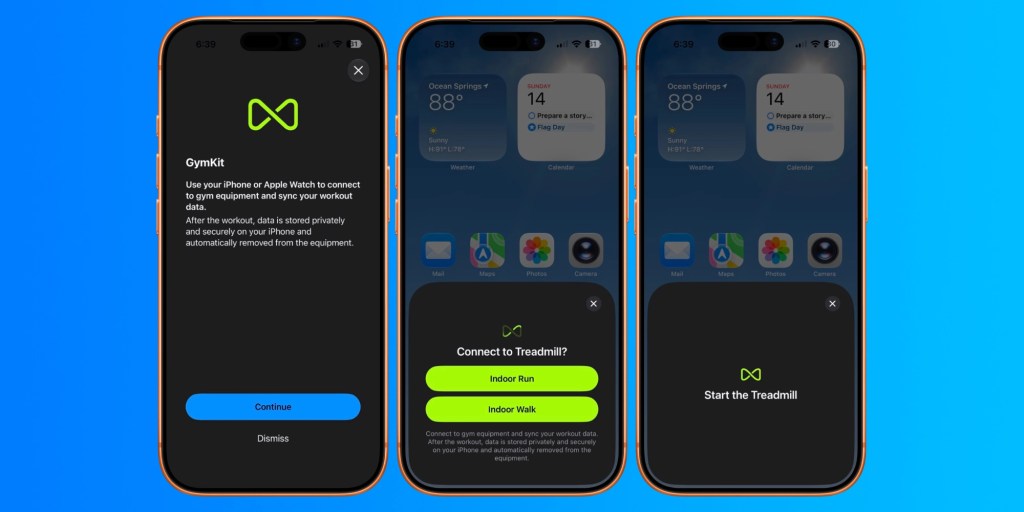
Once the workout started, the treadmill received heart-rate data from AirPods Pro 3. Meanwhile, the Fitness app on iPhone received the treadmill’s distance, pace, incline, and calorie data. Treadmills know details that an iPhone and AirPods can’t know on their own, especially incline and precise belt distance.
As a side note: Apple Watch has more accurate treadmill workout tracking as part of watchOS 27. GymKit remains the gold standard for accurate data, though.
GymKit also avoids two awkward gym habits. You don’t need to hold the treadmill’s metal heart-rate contacts while jogging. You also do not need to wear a Bluetooth heart-rate strap.
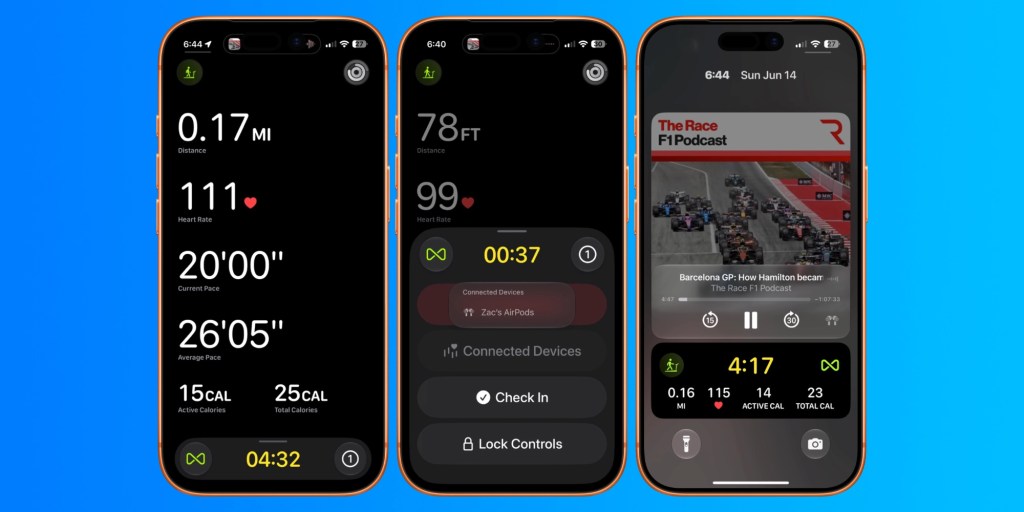
AirPods Pro 3 become the heart-rate source (and likely your podcast or music audio source as well). iPhone becomes the workout computer, which you can monitor during your workout. And the treadmill fills in the machine data while providing the surface for walking or running.
iPhone and AirPods have become more like an Apple Watch
Apple has been moving more fitness features onto iPhone for years. iOS first made the Fitness app useful without Apple Watch as Apple Fitness+ leaned into iPhone as an entry point. AirPods Pro 3 pushed that further as the first AirPods with heart-rate tracking, after Apple tested the idea with Powerbeats Pro 2.
iOS 27 brings those pieces together. GymKit on iPhone shouldn’t replace Apple Watch for people who wear one every day. Instead, it’s a great backup when your Apple Watch is dead, charging, or left at home.
It also gives iPhone and AirPods users a taste of the Apple Watch experience, which could attract future Apple Watch customers.
In testing with iOS 27 beta 1, my Exercise ring didn’t update as I worked out without wearing Apple Watch. But after I put my watch back on, the Exercise ring caught up, and the workout appeared in Fitness with the right data.
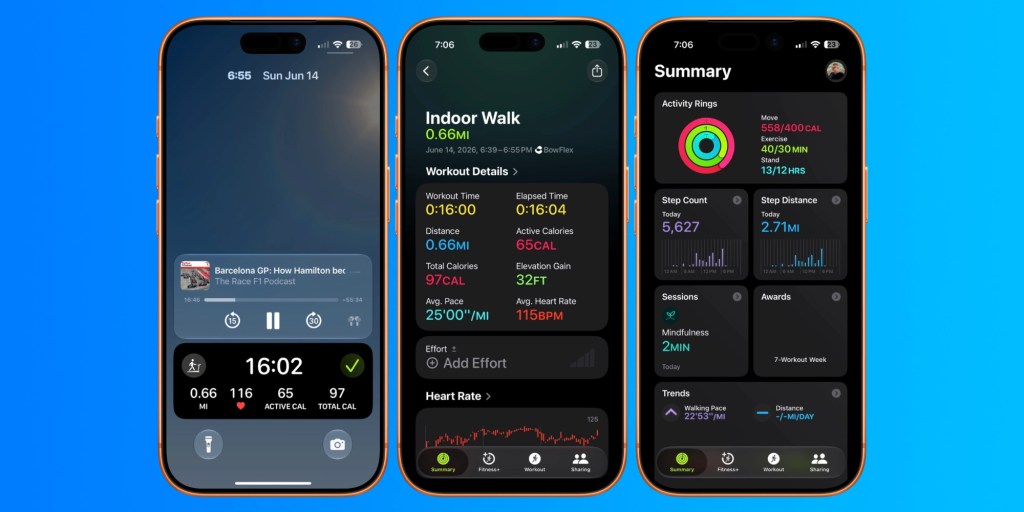
My sample 16-minute treadmill walk showed 0.66 miles, 65 active calories, 97 total calories, 32 feet of elevation gain, and a 115 BPM average heart rate, just like if I’d worn an Apple Watch.
If I tried to use GymKit on iPhone without AirPods, the iPhone disconnected when the workout started because it had no heart-rate source. If I tried to start GymKit from iPhone while wearing Apple Watch, iOS pointed me back to the Workout app on Apple Watch instead, though you can continue without using the watch.
AirPods heart-rate permission also matters. You can manage it in Settings under your AirPods settings and privacy options. I had turned it off, mostly as a theoretical battery-saving move, but this test convinced me to turn it back on. AirPods Pro 3 can also work with Apple Watch to provide the best available heart-rate data.
GymKit on iPhone with AirPods is a great addition to Apple’s Fitness ecosystem
GymKit on iPhone is one of those iOS 27 features that sounds small until it solves a real problem. If Apple Watch is your default workout tracker, it probably stays that way.
But if your watch dies or you forget it at home, iPhone plus AirPods Pro 3 can now log a treadmill workout with real heart-rate data and real treadmill metrics. That’s a neat upgrade, and it makes Apple’s broader Fitness strategy feel more complete.
FTC: We use income earning auto affiliate links. More.