Back to Home
Software

iOS 27 Wallet App Gets 'Create a Pass' Feature

The Wallet app in iOS 27 has a new "Create a Pass" option that's designed to let you add passes for tickets, memberships, and more using Visual Intelligence. If you have a ticket for an event and there's not a digital version available in the Wallet app already, you can create one using the physical pass. By default, the Wallet app uses ‌Visual Intelligence‌ to scan a pass and add it, but there's also a "Create Pass Manually" option. Pass templates include Standard, Membership, and Eve

t
tech4you AI
June 9, 20261 min read
Share

The Wallet app in iOS 27 has a new "Create a Pass" option that's designed to let you add passes for tickets, memberships, and more using Visual Intelligence. If you have a ticket for an event and there's not a digital version available in the Wallet app already, you can create one using the physical pass.
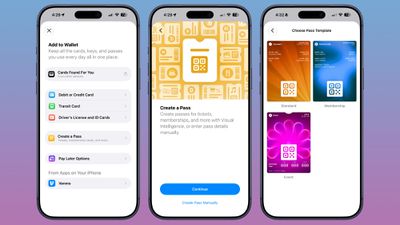
ios 27 wallet create pass
By default, the Wallet app uses ‌Visual Intelligence‌ to scan a pass and add it, but there's also a "Create Pass Manually" option. Pass templates include Standard, Membership, and Event.

Each type includes relevant information like name, location, or admission type, along with a scannable code drawn from an included barcode or QR code that you take a photo of. There are 12 background colors to choose from, or seven custom backgrounds for categories like theater, music, sports, and movies.

Fields can be added or removed as needed when creating a custom pass, with options like label, date, membership, contact, coupon code, VIN, insurance, and more, so most physical cards should be able to be stored digitally.


Originally published on MacRumors
Related Articles

tvOS 27 sneaks out with redesigned Podcasts app & AI subtitle generationSoftware

tvOS 27 sneaks out with redesigned Podcasts app & AI subtitle generation

Released without any real fanfare, developers can now update their Apple TVs to tvOS 27, allowing for on-device AI subtitles on videos, on-screen text size adjustment, a new Podcasts app, and not much more.tvOS 27 is here, with on-device video captioning, text size adjustment, and more.Though iOS 27 was undoubtedly the star of WWDC 2026, tvOS received several meaningful enhancements of its own. These include a redesigned Apple Podcasts app and smart downloads on Apple TV.Additionally, AppleCare

Jun 9, 20262 min
watchOS 27 Gains a Consolidated and Redesigned Find My AppSoftware

watchOS 27 Gains a Consolidated and Redesigned Find My App

Apple yesterday announced a redesigned Find My app in watchOS 27 that brings all tracking functionality into a single, map-centric interface. Previously split across separate Find Devices, Find People, and Find Items apps, the new app now consolidates everything into one unified view. Apple says the update makes it easier to locate the people, devices, and items you care about, with a map-centric layout as the central navigation paradigm. The redesign also introduces more flexible sharing option

Jun 9, 20261 min
Instagram Now Lets Users Reorder Posts on Their Profile GridSoftware

Instagram Now Lets Users Reorder Posts on Their Profile Grid

Instagram is now rolling out a long-awaited feature that lets users rearrange posts in any order on their profile grid. The update, which began reaching users on June 8, is available via the Instagram app for iPhone and Android. To reorder posts, users can go to their profile, long-press any post on the grid, select "reorder grid" from the pop-up menu, then drag content to the desired position. Changes save immediately and are visible to all visitors. Until now, Instagram profiles have displayed

Jun 9, 20262 min