iOS 27's New Compact Clock Gives Your Wallpaper Room to Breathe
In iOS 26, Apple let you stretch the Lock Screen clock down your iPhone's display until it dwarfed everything else. In iOS 27, Apple has a new clock option that does the opposite, with the introduction of a compact mode that shrinks the time to roughly the size of the date and tucks it into the row at the top of the screen. The result is a Lock Screen that genuinely shows off your wallpaper, while still displaying the time and date. If you picked a photo that looks better in its complete framing
In iOS 26, Apple let you stretch the Lock Screen clock down your iPhone's display until it dwarfed everything else. In iOS 27, Apple has a new clock option that does the opposite, with the introduction of a compact mode that shrinks the time to roughly the size of the date and tucks it into the row at the top of the screen.

The result is a Lock Screen that genuinely shows off your wallpaper, while still displaying the time and date. If you picked a photo that looks better in its complete framing, this is the first time iOS gives you the opportunity to see more of it unimpeded.
How to Switch to the Compact Clock
The following steps show you how it's done.
- Touch and hold the Lock Screen, then tap Customize.
- Tap inside the currently set clock frame to open the Font & Color panel.
- Tap the new icon made of two horizontal bars in the top-right corner of the panel to set the clock to compact mode.
- If you're happy with the new look, tap anywhere else on the wallpaper, then tap Done in the top-right corner of the screen.
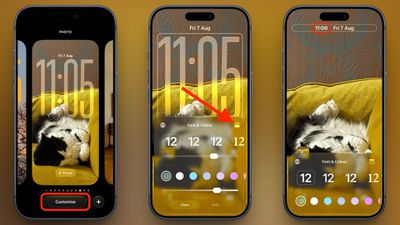
You'll see that the clock shrinks immediately and moves up beside the date, so you can judge the effect against your wallpaper before saving. To go back, simply tap the same icon in the Font & Color panel again. The clock will return to its previous position and size.
Customizations
The new compact clock keeps your existing clock customizations like font, weight, and color, and these can still be adjusted, but you do lose access to the Liquid Glass slider in compact mode.
Bear in mind that the option applies to individual Lock Screens rather than being a global setting, so you can have a compact clock on one wallpaper and a full-size one on another – for a Focus mode, for example. iOS 27 is currently in public beta with general availability expected in September.
Originally published on MacRumors