Among the new features in macOS 27 Golden Gate is the ability to resize the iPhone Mirroring window using additional aspect ratios. Here are the details.
iPhone Mirroring also gets access to Control Center
Apple announced macOS 27 Golden Gate today, featuring fixed rounded corners for windows and apps, the new Siri AI, and improvements to Apple Intelligence sprinkled across the system.
However, like on iOS 27, the system includes several minor tweaks that Apple didn’t show in today’s WWDC keynote.
One of them, as spotted by my colleague Dylan McDonald, is the ability to resize the iPhone Mirroring window.
Until now, iPhone Mirroring has been limited to the iPhone’s actual aspect ratio. There are options to adjust the size, but the aspect ratio remains the same.
With macOS 27 Golden Gate, users will be able to adjust the window’s aspect ratio, in addition to its size, bringing more flexibility to users whose workflows rely on iPhone Mirroring.
Currently, there seem to be several fixed aspect ratios available for resizing the iPhone Mirroring window, meaning the system adjusts the window to the nearest supported shape rather than allowing users to choose any arbitrary aspect ratio.
Depending on the chosen aspect ratio, iPhone Mirroring displays either adjusted versions of the app’s iPhone layout, or its iPad layout when available. Aspect ratio adjustments are only available to iOS 27-ready apps, which at the moment means only native iOS apps.
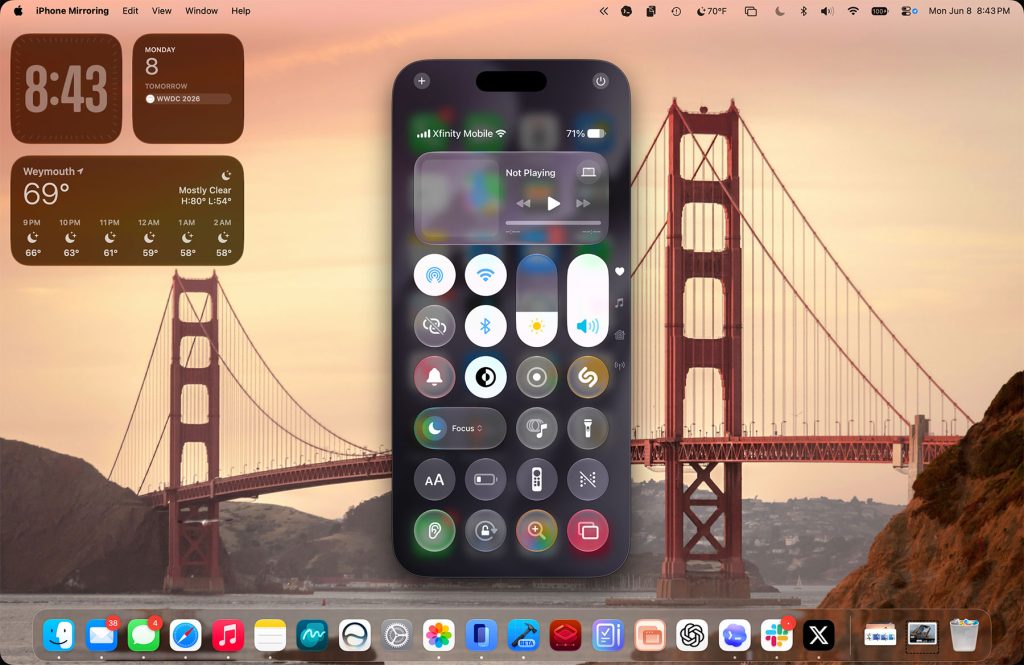
With macOS 27 Golden Gate, iPhone Mirroring also gains support for Control Center, joining the Home Screen, App Switcher, and Spotlight as iPhone areas users can mirror from the Mac.
For ongoing updates and full coverage of WWDC26, head over to our news hub.
Worth checking out on Amazon
FTC: We use income earning auto affiliate links. More.