Apple has updated its free Final Cut Camera app, which remains made for Final Cut Pro on the iPad, but its improvements include easier transferring of footage to the Mac.
Alongside its latest update to Final Cut Pro for the Mac and the iPad, Apple has released a new version of its free companion app, Final Cut Camera for iPhone. This is the app that lets filmmakers shoot simultaneously on multiple iPhones, and have the footage be monitored and controlled live on an iPad.
There are improvements to how that iPhone to iPad workflow is done, but what will appeal most to long-time Final Cut Pro users is how the footage can be sent to the Mac. It is still not the case that the Mac can be used live as the iPad can, it is only that there are fewer steps to get the footage across.
Previously, all of the footage from all of the iPhones would end up on the iPad. Then the quickest way to get the footage over to a Mac would be for Final Cut Pro for iPad users to assemble a project and export the whole thing.
That whole project could then be AirDropped or, more likely given the size of the files, copied onto an external drive on the iPad.
Now Final Cut Camera can be connected to the Mac directly, and the footage imported into Final Cut Pro for macOS. To do this, you can now:
- Connect the iPhone and Mac over a USB cable
- Open a Finder window on the Mac
- Click on your iPhone in the Locations section
- Select Files from the list across the top of the window
- Click on the disclosure triangle next to Final Cut Camera
- Drag the files to the Mac
This is really just treating the iPhone as an external drive to the Mac, but it's a shorter, faster process than before. Given how often the MacBook Pro is present at shoots, it's a shame they still can't be used to directly monitor and control Final Cut Camera, though.
Monitoring and control improvements for iPad
Final Cut Camera users on the iPhone now have a Clean HDMI Out feature. This means that an external monitor can now be used to show what's being shot, which could be convenient on a set or location shoot.
Definitely good, though, is that this clean feed removes all sign of controls that are on the camera. So what a director or producer sees is an uninterrupted view of the footage being shot.
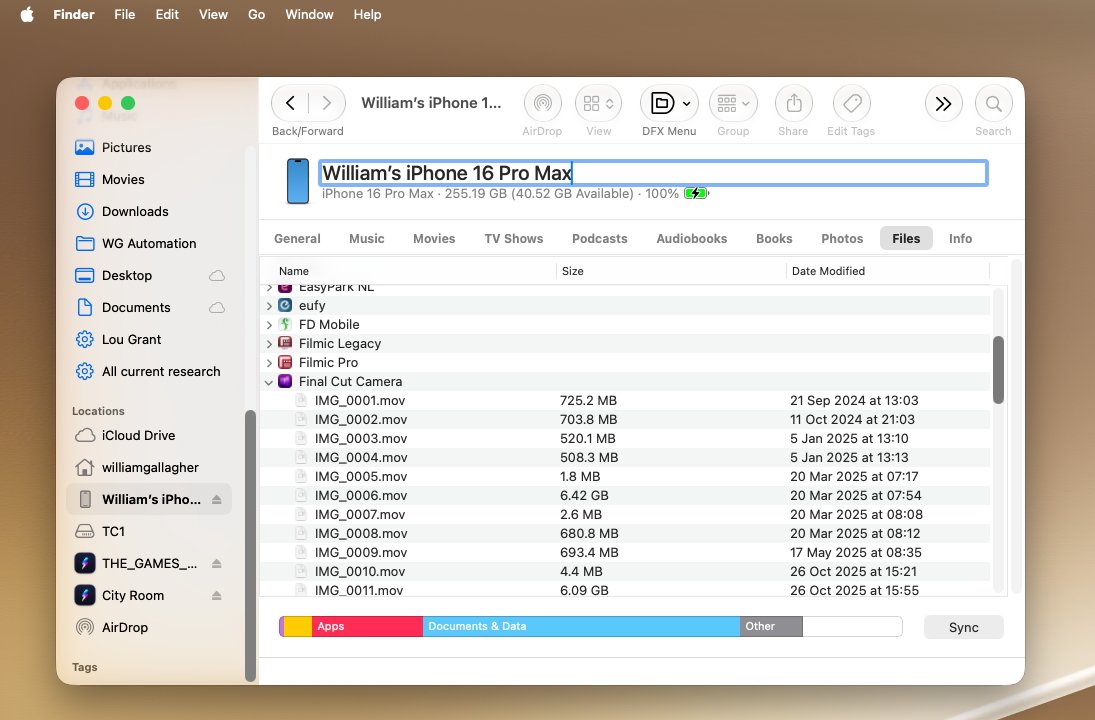
Final Cut Camera footage now shows up in the Finder's Files section when an iPhone is connected directly to a Mac.
Apple says that this footage has "incredible video fidelity and editing performance," that comes with more options for balancing image quality and file sizes. Plus it now allows users to choose from ProRes 422, ProRes 422 LT, or ProRes 422 HQ in that search for the right combination of quality and storage space.
One last key thing that will certainly be welcomed is the new ability to entirely disable digital zoom. Especially when Final Cut Camera is being controlled from a remote iPad, it has been exceptionally easy to zoom too far and go from optical to digital zoom.
Digital zoom is impressive, but optical zoom is what filmmakers need. Now the iPhone's Final Cut Camera can be prevented from ever crossing over that line and producing sub-par footage.
Final Cut Camera for iPhone is free and available now. The Clean HDMI Out feature requires an iPhone 17 Pro, and the choice of ProRes formats requires an iPhone 13 Pro or later.