You wouldn’t know that the Apple Watch Series 12 is a big deal just by looking at it. It has the same design, buttons, sizes, and sensor types as generations of Apple Watches before it. But under the hood, the Series 12 builds in major changes that lay the groundwork for big ideas about the future of health and wearables.
The Apple Watch Series 12 is the start of a new wearable era
You wouldn't know that the Apple Watch Series 12 is a big deal just by looking at it. It has the same design, buttons, sizes, and sensor types as generations of Apple Watches before it. But under the hood, the Series 12 builds in major changes that lay the groundwork for big ideas about the […]
t
tech4you AIThese ideas — and this year’s updates — can be divided into two parts: catching up to the recent boom in AI health and leading the way in AI wearables that surface helpful information based on your entire day. When it comes to the former, Apple is catching up to the rest of the wearable space, which has eagerly embraced AI as a way to make sense of all your health data. With the latter, Apple is potentially kicking the door down on what’s been a niche, nascent, and recently problematic market. (Either way you slice it, AI is part of the equation.) Most of the ideas explored with the Series 12 aren’t novel, but they haven’t been implemented by a company with Apple’s scale or reputation.
$399
The Good
- Faster charging
- Redesigned sensor array
- Ceramic is back
- Thoughtful privacy structure for Audio Intelligence
- Siri on the wrist is more useful
The Bad
- Thoughtful privacy may not change how laypeople feel
- Many of the new features aren’t available at launch
After a week with the Series 12, I can’t say I have a complete picture. Several of the most interesting health and AI features aren’t launching until later this year and weren’t available for review. But even without them, the revamped internals provide some meaningful upgrades. So for now, this is a look at the health features that’ll be available at launch — and a preview of the wild AI ideas to come.
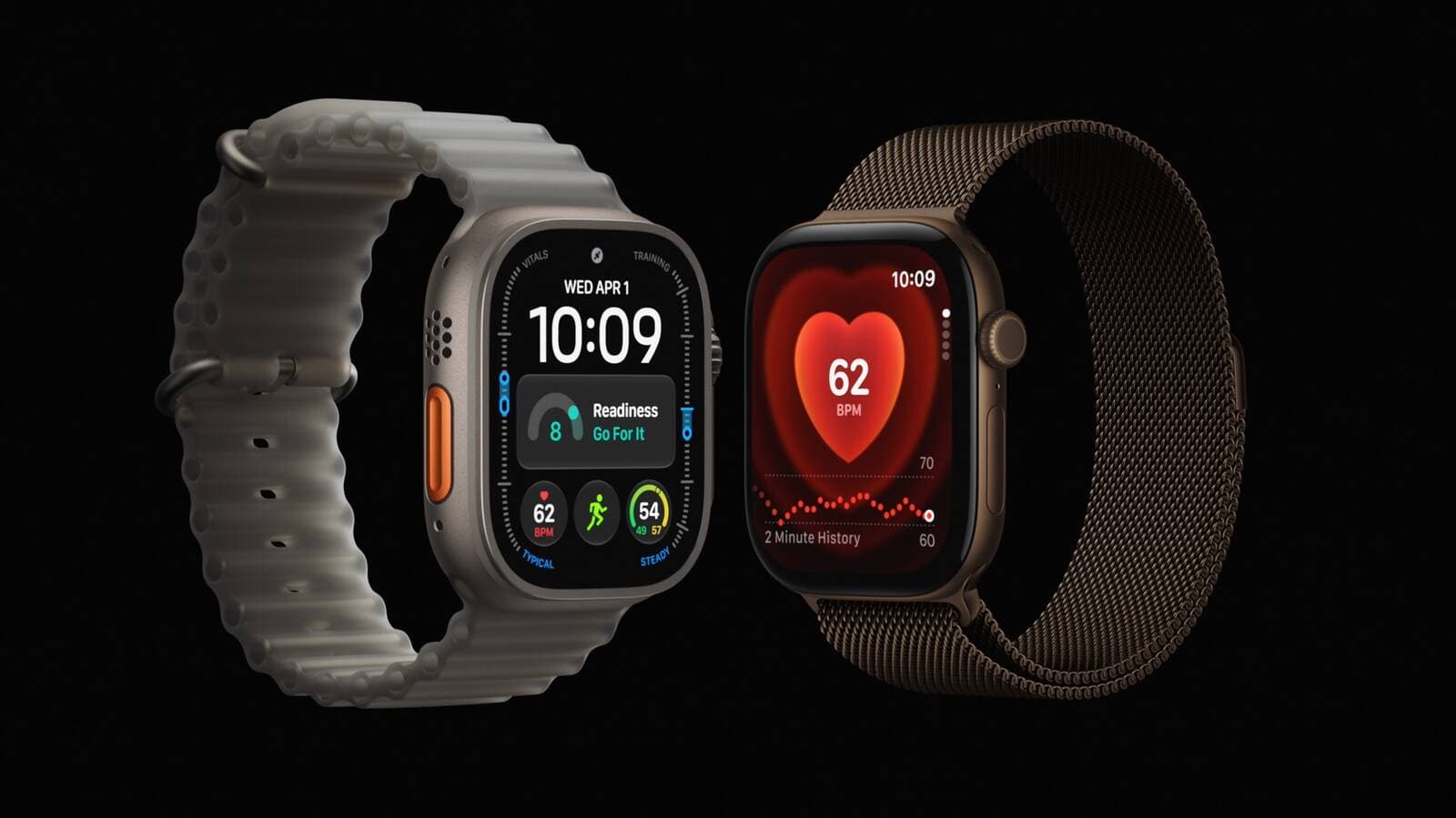
Two key hardware updates separate the Series 12 (and the Ultra 4) from previous Apple Watches. The first is the new S11 chip, which features a secure exclave for microphone data processing on top of a faster CPU, GPU, and Neural Engine. There’s also a completely redesigned health sensor array. This new array doesn’t necessarily capture new data, but it enables the watch to measure health metrics in a more frequent, accurate, and power-efficient way. The electrodes that enable the EKG feature are larger to ensure better skin contact, the photodiodes have been reconfigured to capture reflected light more efficiently, and larger, less power-hungry optical LEDs are in place to shine light into the skin.
Together, these hardware upgrades enable a host of new software features, including more frequent heart rate sampling, a new readiness score, and a brave new world of Audio Intelligence, which is what Apple is calling its upcoming suite of AI-powered ambient listening features.
Most notably, the redesigned sensors mean the Series 12 and Ultra 4 are now capable of truly continuous heart rate monitoring. Previously, to preserve charge, Apple Watches only sampled heart rate once every five minutes when you weren’t working out. Now, the Series 12 measures heart rate every five seconds, both at rest and during activities. Other wearable companies have been able to do this for ages, but this is a genuinely helpful update for folks who might need to monitor heart rate due to chronic illnesses.
Apple put out a white paper comparing how accurate its continuous heart rate monitoring is to a gold-standard Polar H10 chest strap, as well as competitors like the Pixel Watch 4, Samsung Galaxy Watch 8, Oura Ring 5, and Whoop across several types of workouts and at rest. (It’s an interesting read for wearable nerds!) I’d need roughly eight arms and legs to replicate this study in a week, and alas, I’m not an octopus. However, I did wear an H10 chest strap during two runs (one steady state and one interval run), a walk, and while at rest. At all times, the Series 12 was within five beats per minute of the H10. There was a slight lag compared to the H10, but in regular use, you’re not going to notice that four-second difference.
I’ll continue testing the Series 12 and Ultra 4 against other devices and across activity types, but I’m pretty confident the Apple Watch is now in line with many other popular wearables.
The S11’s impact was also noticeable in testing. Siri AI queries are faster on the Series 12 than my Ultra 3. You still might run into latency as Siri “thinks,” but not as much. If you want more in-depth thoughts about Siri on the wrist, my opinion hasn’t changed from my watchOS 27 preview. In a nutshell, this is the most capable wrist computer Apple’s made, and adding a single pinch gesture to select items makes one-handed control the best it’s ever been.
I didn’t notice a negative impact to battery life from continuous heart rate tracking. People will gripe that the Series 12 doesn’t have multi-day battery and sticks to the Series 11’s 24-hour battery estimate. But like last year, I maintain that faster charging is a fine enough solution. In a 20-minute charging test, I went from 20 to 64 percent battery. Yes, that does mean charging daily in little spurts, but I’ve yet to have the watch die on me. I vehemently believe everyone needs to let their wrists breathe daily, and showering is the perfect time to go watchless. You’ll survive 20 to 30 minutes of no data.
All this new hardware paves the way for a much more robust health tracking experience. That’s probably why, later this fall, we’re getting a new, redesigned Health app. From the demos I’ve seen, it’s going to be a dramatic change. There’ll be AI-powered insights, a longevity tab that includes a Health Age score, VO2 max assessment tests using your phone’s camera, and even the ability to order a blood panel through Quest Diagnostics for $119. The redesigned app is currently available in the latest iOS 27 developer beta, and I’ll give my early impressions on that soon. However, in this review I’m only going to talk about what’s available to everyone at launch.
The big update ready today is Apple’s take on a readiness score. Readiness scores were popularized ages ago by Fitbit, Oura, and Whoop and are meant to be a digestible gauge of how well you’ve recovered from physiological stress. In essence, how “ready” you are to work out again.
Apple assesses “readiness” through a combination of overnight, daytime, and weekly metrics like activity, sleep score, and overnight vitals encompassing resting heart rate, respiratory rate, wrist temperature, and a new metric called recovery heart rate variability (HRV). You might think — wait, my Apple Watch has been able to measure HRV for years. You’d be correct. This new recovery HRV metric uses a different formula and is enabled by the fact that the watch’s updated sensor array can now take any HRV measurement much more frequently. Whereas “regular” HRV is meant to be a longitudinal look at your overall stress and cardiovascular health, Apple uses recovery HRV as a gauge of your daily, short-term strain. (And because this is enabled by the new array, it does mean readiness requires at least a Series 12 or Ultra 4.)
It takes a hot minute to generate the score — seven nights of sleep in which you get at least four hours of rest. On the eighth day, you wake up with a score from 0 to 10. A 0 to 1 means you should recover, a 2 to 4 means “pace yourself,” 5 to 7 is a benign “ready,” and anything 8 and above is a signal to “go for it.” My week of serious sleeping and accuracy testing culminated in a readiness score of 7.
I’m of the opinion that people intuitively know whether they feel like working out or not. This is a feature that’s most useful for stubborn athletes who overtrain and need a reminder to not burn themselves out. I appreciate this isn’t a static score. A powerful nap or an extra hard workout could cause your readiness score to rise or fall during the day. For the Garmin nerds, I’d say it’s like a combination of Body Battery (which estimates your energy levels in real time) and traditional readiness scores. Given that wearable companies keep pumping out new metrics, I appreciate that Apple’s chosen to consolidate what could’ve been multiple data points into one.
After WWDC, I wrote that I was relieved Apple wasn’t diving full-on into AI health coaching features. I have to eat my words a teeny bit, considering Apple is clearly starting to incorporate some — though not all — of the AI health trends I’ve seen cropping up over the past two years. So far, I think Apple is carefully weighing what trends to hop on and which ones to avoid. That’s a smart long-term move. But I’m still relieved Siri AI isn’t playing a larger part just yet.
Audio Intelligence, part one
Aside from faster, more power-efficient performance, the S11 chip also enables the most surprising update to the Series 12: ambient listening. That ability is what enables Audio Intelligence, a suite of four features that essentially turn the microphone into a potentially powerful AI tool.
The two flashiest features are Live Rewind and Siri Recap. The former lets you read a short transcript on your wrist of the past 15 seconds, while the latter is a high-level summary of conversations you’ve had during the day. In this summer of public backlash against so-called pervert glasses and Flock cameras, these two features understandably stirred up a lot of concern and emotion on social media. That said, I wasn’t able to test these features because they’re not available yet. They’ll arrive later this year via a software update.
What was available to test was faster Shazam for identifying songs and sound recognition for alerting you of potentially urgent nearby noises. Both of these features require you to opt in and are not turned on by default. If you do turn on music detection, it is extremely fast. You can just pinchy pinch to bring up the Smart Stack, AI will surface the Shazam widget, and boom — there’s the song, correctly identified. (I did trip it up a teensy bit by rapidly switching between songs, but that’s not likely to happen in an organic Shazam experience.)
Testing sound recognition, which is an accessibility feature for the deaf or hard of hearing, was less conclusive. It’s designed to flag on the wrist when sounds like doorbells, alarms, or sirens go off. Ironically, I haven’t had my doorbell ring this past week, but I did pull up several YouTube videos of doorbell chimes at various volumes. None triggered the feature. I think that’s a good thing. In my previous tests with other ambient listening AI wearables, they struggled to distinguish between “real” sounds and TV shows. The last thing you want is a fictional doorbell triggering an annoying, real-life alert. A blaring truck horn also didn’t trigger the feature, as it wasn’t a siren. I’ve asked Apple whether there’s specific tuning to minimize false positives, but I haven’t heard back yet.
I’ll do a deeper dive into Audio Intelligence once the whole suite of features is available. But to me, it’s clear that Apple has been taking notes about the burgeoning AI wearable space. It’s a deliberate choice to introduce these features on the Apple Watch, an already familiar and beloved device. As other tech companies deal with surveillance and harassment concerns, Apple’s published a privacy white paper and support documents to position itself as a leader trying to set a new standard. If successful with the public, it’s not a stretch to see how Apple might include these kinds of features on a pair of smart glasses or, perhaps, AirPods with camera sensors. If not, it’s no big miss. The Apple Watch is already a useful, sometimes lifesaving device without Audio Intelligence.
The most interesting, and perhaps consequential, piece of this rollout is that it comes from Apple, a wildly successful tech company with the strongest privacy reputation in Silicon Valley. If it can’t make this category of device work, that certainly doesn’t bode well for AI wearables as a whole.
In many ways, this is an incomplete Series 12 review. Judging solely on what’s available today, this is a straightforward hardware upgrade that closes the gap between Apple and the standout perks of more niche rivals like Whoop and Oura.
For those pondering upgrades, Apple has laid a strong foundation with its hardware for some ambitious features down the road. I’d understand if you have qualms about Audio Intelligence and privacy, and to those folks: I’ll remind you that last year’s models are still great, probably available on sale, and don’t come with as many privacy questions.
Otherwise, the Series 12 is a worthy upgrade if you’re sporting a Series 6 or earlier. Series 7 and 8 users should weigh how much they care about AI features versus their device’s current battery life, as watchOS 26 will continue to get security updates. Series 9 and later don’t need to upgrade unless, perhaps, they have a chronic illness that could benefit from the improved continuous heart rate monitoring. The excellent SE 3 remains my recommendation for smartwatch newbies who just want a basic fitness tracker. I’ll have an Ultra 4-specific review out soon, but I can already tell you that’s for folks who like big screens, better battery life, and aspire to the outdoor life.
If the Series 12 only had a new sensor array, updated Health app, and a more useful Siri on the wrist, that’d be a significant update and win on its own. But there’s a lot more here that’s going to change this product in some fundamental ways over the next few months. I have a feeling that Apple’s ambitions for the watch don’t end with health tracking.
Agree to Continue: Apple Watch Series 12
Every smart device now requires you to agree to a series of terms and conditions before you can use it — contracts that no one actually reads. It’s impossible for us to read and analyze every single one of these agreements. But we started counting exactly how many times you have to hit “agree” to use devices when we review them, since these are agreements most people don’t read and definitely can’t negotiate.
You can only use the Apple Watch Series 12 with an iPhone. That means you’ll have already agreed to the iPhone’s terms of service and privacy agreements. Optional services, like Apple Pay, Apple Music, or Fitness Plus, will also come with their own agreements. Using the Health app also comes with its own terms and conditions. Audio Intelligence features are opt-in and are not turned on by default.
If you choose to enable cellular service, you’ll also have to agree to your carrier’s terms. I activated cellular on T-Mobile and was asked to agree to one mandatory agreement. If you add any third-party apps or integrations, you must also agree to those individual terms and privacy policies.
Specific to the Apple Watch, you must agree to the following:
Some features, like hypertension notifications, EKG, sleep apnea, or blood oxygen monitoring, may also require you to disclose your location data, as it depends on local regulatory clearances.
Final tally: One mandatory agreement plus any mandatory agreements for your iPhone. Several, several optional agreements.
Follow topics and authors from this story to see more like this in your personalized homepage feed and to receive email updates.
Originally published on The Verge