American Express is bringing Membership Rewards points directly to Apple Pay checkout to give eligible cardholders a faster way to use their rewards for eligible online and in-app purchases. Here's how to use it.
The new "Use Rewards" option appears during Apple Pay checkout when an eligible American Express Membership Rewards card is selected. Card members can choose how many points to apply toward all or part of an eligible purchase before completing the transaction.
Eligible cardholders can now apply Membership Rewards points during Apple Pay checkout. Card members no longer have to redeem points separately through the American Express app or website.
The rollout is limited to eligible U.S. Membership Rewards cardholders using Apple Pay for online and in-app purchases. American Express didn't announce support for in-store Apple Pay transactions.
How to use Membership Rewards points with Apple Pay
Eligible cardholders can redeem Membership Rewards points during Apple Pay checkout in a few steps.
- Shop online or in an app that accepts Apple Pay.
- Select Apple Pay at checkout.
- Choose an eligible American Express Membership Rewards card.
- Tap Use Rewards.
- Enter how many points you want to apply toward the purchase.
- Complete your Apple Pay transaction.
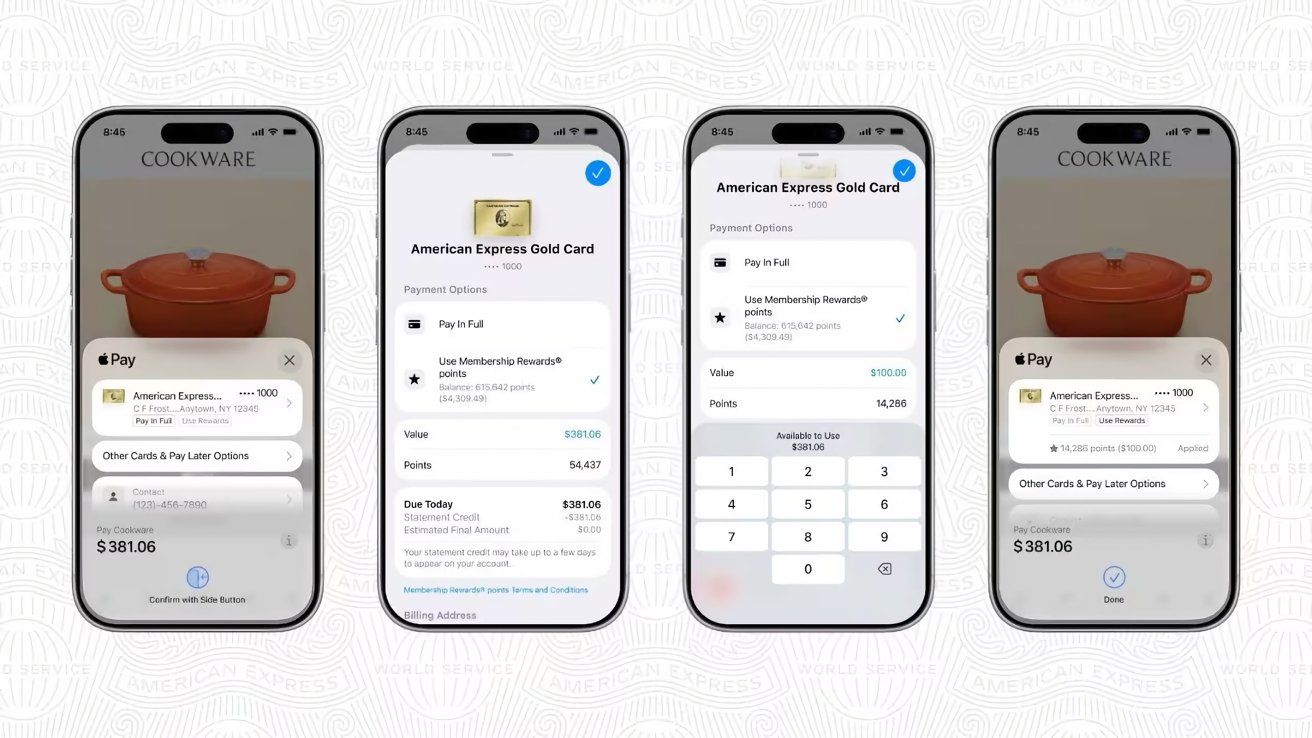 Eligible cardholders can now apply Membership Rewards points during Apple Pay checkout. Image credit: American Express
The redemption process takes place entirely within the Apple Pay checkout flow without requiring users to switch apps or complete additional steps.
The announcement follows American Express' earlier disclosure that Fanatics will become a Membership Rewards transfer partner. Together, the additions expand where eligible cardholders can redeem Membership Rewards points across purchases and other rewards programs.


![TP-Link Roam 7: Don’t leave home without this reliable travel router [Review] ★★★★☆](/_next/image?url=http%3A%2F%2Ftech4you.club%2Fmedia%2Farticles%2Fcovers%2Fcover_gOhGs0N.webp&w=3840&q=75)