Lenovo ThinkPad X1 Carbon Gen 14 review: A classic design in a lighter package
The ThinkPad X1 Carbon Gen 14 combines classic style with an incredibly light 2.2-pound case.
The ThinkPad X1 Carbon Gen 14 is simply a joy to use, especially if you're a fan of the classic ThinkPad aesthetic. Our review unit's Core Ultra 7 355 chip and 32GB of RAM didn't break a sweat during my typical workflow, which involves juggling multiple browsers with dozens of tabs, Slack, photo editing and either Spotify or YouTube playing music in the background. It's an absolute workhorse for office productivity, though the lack of more powerful Xe graphics makes it less suitable for video editing, 3D rendering and gaming.
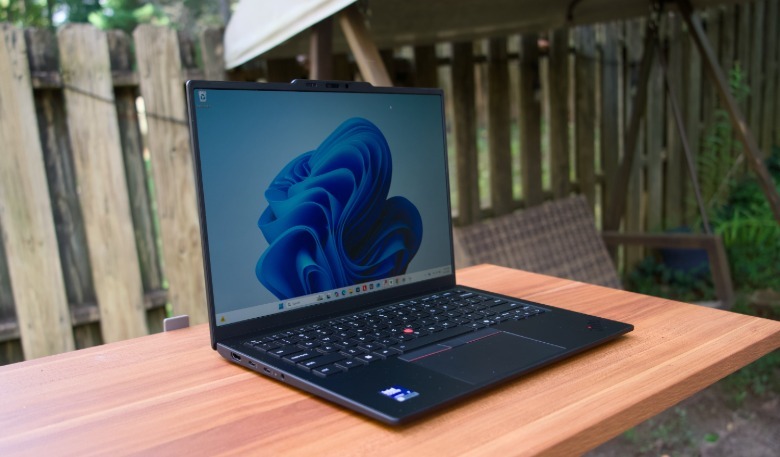
But come on, this is an ultra-light ThinkPad, not a heavy media-editing tank. For its intended purposes, the ThinkPad X1 Carbon simply excels. It's also a joy to travel with: At 2.2-pounds, it's easy to slip into a light messenger bag or bookbag. Its glorious OLED display even makes boring corporate slideshows leap off the screen. And I genuinely appreciated its matte layer since few systems let me work outside on a bright day without being bombarded by screen reflections.
The ThinkPad's Intel Graphics GPU holds it back when it comes to gaming, but that's not exactly a surprise. It scored 500 points higher than the Yoga Slim 7i in the 3DMark Wildlife Extreme benchmark, but it pales in comparison to any laptop with more serious graphics hardware. If you like the ThinkPad's aesthetic and just need better 3D performance, be sure to upgrade to an Intel chip with Xe graphics. I was able to play Overwatch in 1080p with low graphics settings, but it wasn't exactly an enjoyable experience. Everything looked blocky and bland. At the very least, the ThinkPad's 120Hz screen means you could stream games over the cloud at up to 120 fps.
 Devindra Hardawar for Engadget
After spending a week with the ThinkPad X1 Carbon, I've grown to appreciate the little things it does right. Its keyboard is one of the best I've ever used in such a thin system. I was able to pound out this review without any major annoyances, which is more than I can say for the flashier keyboards on Dell's new XPS 14 and 16. Its trackpad, despite not being haptic, is also a dream to use. I've never encountered a mistaken left or right click.
Hell, even the ThinkPad's speakers sound great, and that's something I rarely get to say about Windows PCs. It only has two downward-firing speakers, but they use Dolby Atmos to deliver a surprisingly expansive soundscape. It was perfect for watching YouTube videos, or for enjoying some light music at night. There's just a hint of low-end to make the system shake a bit, but what's truly impressive is the overall clarity of the speakers. Still, I'd be interested to hear how Lenovo could push the quality even further if it squeezed in a quad-speaker system like the MacBook Air and XPS 14.
Much like the Yoga Slim 7i, I was impressed by the ThinkPad X1 Carbon's five megapixel webcam. It looks almost like a professional camera during video calls, and it looks even better once you turn on Windows Studio Effect's portrait mode, which slightly blurs your background.
As for battery life, the X1 Carbon lasted precisely 16 hours in PCMark 10's Modern Office benchmark. That's about the midrange of what we're seeing with ultraportables today. The Yoga Slim 7i lasted about an hour and a half longer in the same test, while HP's Omnibook X reached a massive 18 and a half hours.
Originally published on Engadget