Word of a new iOS 27 freeze bug is spreading fast across social media. It can lock up your iPhone’s home screen with nothing more than a few quick swipes.
The glitch has already turned into a prank between friends. It’s completely harmless, but can make your iPhone feel dead until you know the fix.
The iOS 27 freeze bug is unfortunately easy to trigger
iPhone bugs range from irritating to dangerous. Some simply make an app crash, but others can create vulnerabilities that attackers can exploit. Fortunately, most software glitches fall somewhere toward the harmless end of that spectrum. And that’s true for this iOS 27 freeze bug, too.
The glitch was first documented earlier this week. Unlike older iPhone soft-locks, which usually needed complicated gesture combos, this one is trivially easy to reproduce.
Here’s the sequence. Go to the iPhone Home Screen. Swipe down from the top-left corner as if you are opening the Notification Center. And almost immediately — before that animation even finishes — swipe down from the top-right corner to pull up Control Center. Finally, dismiss the Control Center.
If it worked, your phone will look broken. The Camera and Flashlight buttons on the lock screen are stuck at the top of the screen. You won’t be able to swipe between home screens, and taps on icons and buttons will stop registering reliably.
Even holding the side button to reach the power-off slider won’t do anything.
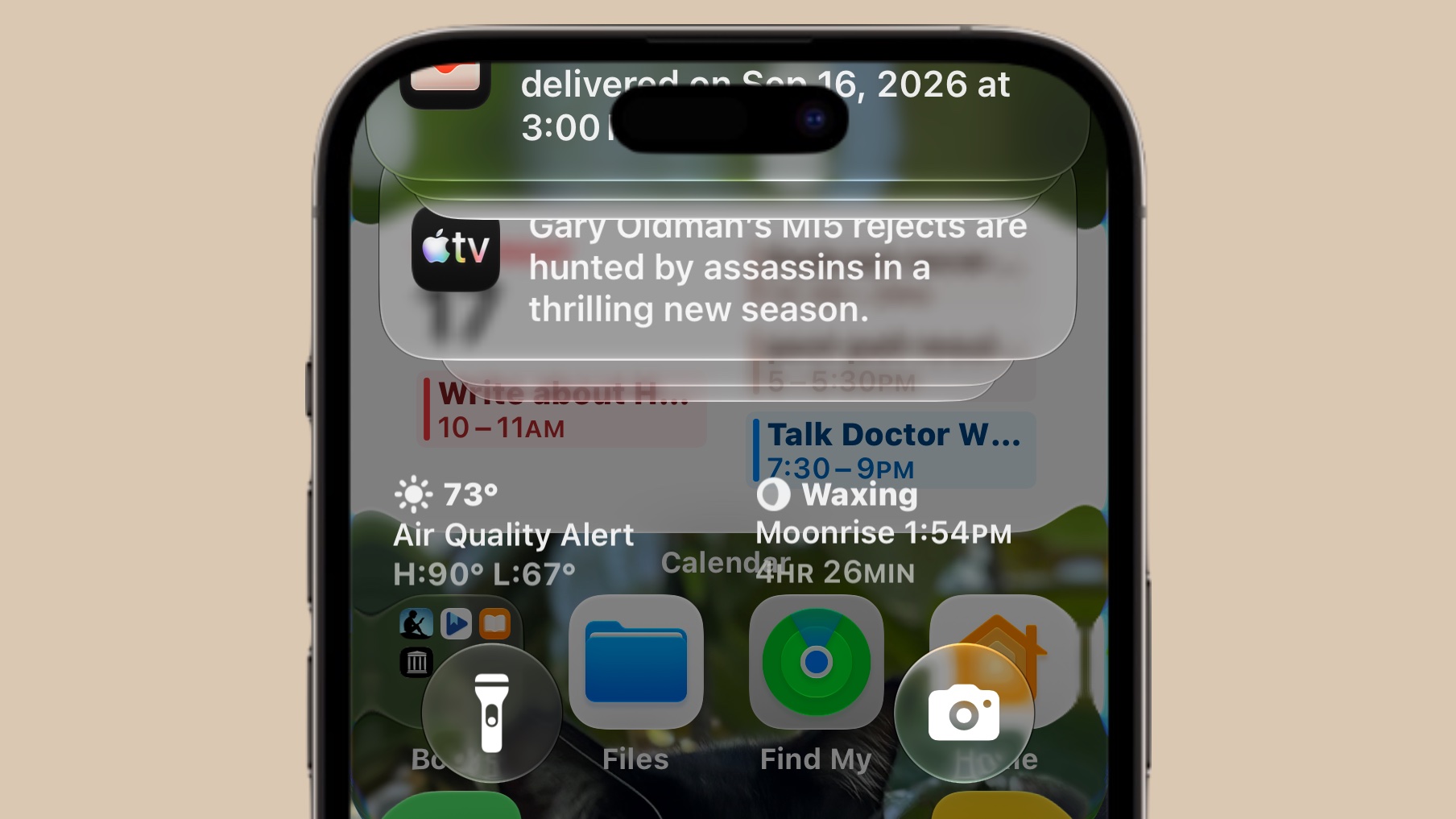
Screenshot: Ed Hardy/Cult of Mac
How to force restart a frozen iPhone
The fix is the same one Apple recommends for most iPhone freezes. Press and quickly release the volume up button, followed by a quick press and release of the volume down button. Finally, hold down the side button until the Apple logo pops up on the screen.
Your iPhone will now shut down and restart. Once it boots back up, everything should work normally again.
Apple hasn’t fixed the glitch yet
The bug reportedly shows up in iOS 27. It was also spotted on the newly released iOS 27.2 beta, suggesting Apple hasn’t patched it internally.
That timing lines up with how these soft-locks have played out before. Apple has shipped iOS versions with similar freeze glitches in the past, but the company typically patched them later with an update rather than rushing out an emergency fix.
The iOS 27 freeze bug isn’t dangerous to your iPhone. It won’t damage your data or hardware, but it is an annoying software hiccup that happens to be extremely shareable. That’s exactly why it’s racking up views instead of quietly getting reported and forgotten.
If your phone locks up mid-swipe, don’t force a factory reset or head to the nearest Apple Store. A ten-second force restart is all it takes to get your iPhone back to normal.